Personal Research Assistant: Your Own AI on Your Own Library
A personal research assistant is the AI you already use, reading a private library of everything you saved. How to capture, synthesize, and verify with it, and what to check before you trust one.
On this page
- Your Reading, Searchable by You and by Your AI
- When old filing systems break
- What changes in practice
- The Three Pillars of a Modern Research Assistant
- Capture
- Enrichment
- Recall
- Where the Assistant Actually Lives: Your Own AI, Reading Your Context
- The Workflow: Capture, Synthesize, Verify
- Refine the question before you collect
- Capture first, organize second
- Synthesize across the library, not one document at a time
- Verify before you cite
- Automate the unseen work, not the judgment
- How Professionals Use a Personal Research Assistant
- The student building a thesis trail
- The writer who works across formats
- The researcher managing depth, not just volume
- The operator inside a noisy job
- Key Criteria for Selecting the Right Tool
- Ask how private the library really is
- Test search before you trust anything else
- Check format support and citation behavior
- Match the pricing model to your behavior
- Research Assistants vs Note-Taking Apps
- Different jobs, different defaults
- Where each one wins
- Frequently Asked Questions About Personal Research Assistants
- Is this a deep-research agent?
- Can my own AI (Claude or ChatGPT) use my saved research?
- Can I trust AI summaries of papers and reports?
- How do I avoid hallucinated citations?
- Is using AI for research considered cheating?
- Is this just a smarter bookmarking app?
- Do I need to pay before I can test it?
- How much setup does it take?
- Can it help me find research gaps?
- Will it replace my own judgment?
A personal research assistant is the AI you already use, working from a private library of the sources you actually read. Not a deep-research agent that browses the open web on your behalf, and not a separate chatbot bolted onto a note app: a context layer of your own articles, PDFs, threads, videos, notes and past AI chats that Claude, ChatGPT, Codex or any other assistant can read while it answers you. This guide explains what that layer has to do, how to run a research workflow on top of it (capture, synthesize, verify), how to choose one, and what to check before you trust it.
Your research system is probably a familiar one. A few browser windows with too many tabs. PDFs saved to a folder that made sense three months ago. Notes in Apple Notes, Notion, Obsidian, a doc app, maybe a voice memo. A useful YouTube explanation you meant to revisit, and an AI chat thread with the best summary you've seen, now buried under newer conversations.
That setup works right up until you need to recall something specific. Not just "the article about battery materials," but the exact chart, the caveat in the third paragraph, the quote from the interview transcript, and the video that explained the same concept in plain English. At that point the problem isn't collecting information. It's getting your own reading back in front of the AI you're working with.
Your Reading, Searchable by You and by Your AI
The failure point in most knowledge systems isn't capture. People save plenty. The failure point is retrieval under pressure.
You sit down to write a report, thesis section, investor memo, or article. You know you've already done the reading. You remember the shape of the idea, but not where it lives. So you reopen search engines, retrace old steps, and duplicate work you already did once. Worse, the AI you draft with has no idea any of that reading happened, so it answers from the open web and you spend the next ten minutes pasting excerpts into the chat.
That's the daily friction a personal research assistant removes. Instead of treating saved material as a pile of files, it treats your library as one body of context that both you and your AI can search. Articles, PDFs, notes, screenshots, transcripts, and chat threads stop being separate objects.
When old filing systems break
Manual organization feels responsible, but it collapses under real workloads. The more sources you handle, the more brittle folders and hand-made tags become. A note can belong to five projects at once. A screenshot can matter more than the article it came from. A saved thread can be more useful than the original source.
That's why people outgrow the bookmarks bar and start looking at tools that keep the content, not just the link. They don't need a prettier list of URLs. They need a way to stop losing context.
What changes in practice
Once the system works, your behavior changes. You save more broadly because you trust retrieval more. You stop over-filing. You ask your AI full questions about what you've read instead of hunting with fragments, and it answers from your sources instead of from the open web. Your library starts behaving the way your memory does, except this version is searchable, source-aware, and much less fragile.
The Three Pillars of a Modern Research Assistant
The easiest way to understand a personal research assistant is to imagine an unusually competent librarian working next to a colleague who does the thinking. The librarian accepts anything you hand over, reads it, indexes it, and finds the right page on request. The colleague (your AI) asks the librarian for what it needs and writes the answer.
That work falls into three pillars: capture, enrichment, and recall.
Capture
Capture is the intake layer. If this part is clumsy, the whole system breaks because you won't use it consistently.
Good capture means the assistant can take in material from the places where research actually happens:
- Web content from articles, newsletters, and social threads with their replies
- Documents like PDFs, slides, and scanned files
- Messy media such as screenshots, images, and YouTube videos with their transcripts
- Working material including your own notes and the AI chats where you already worked something out
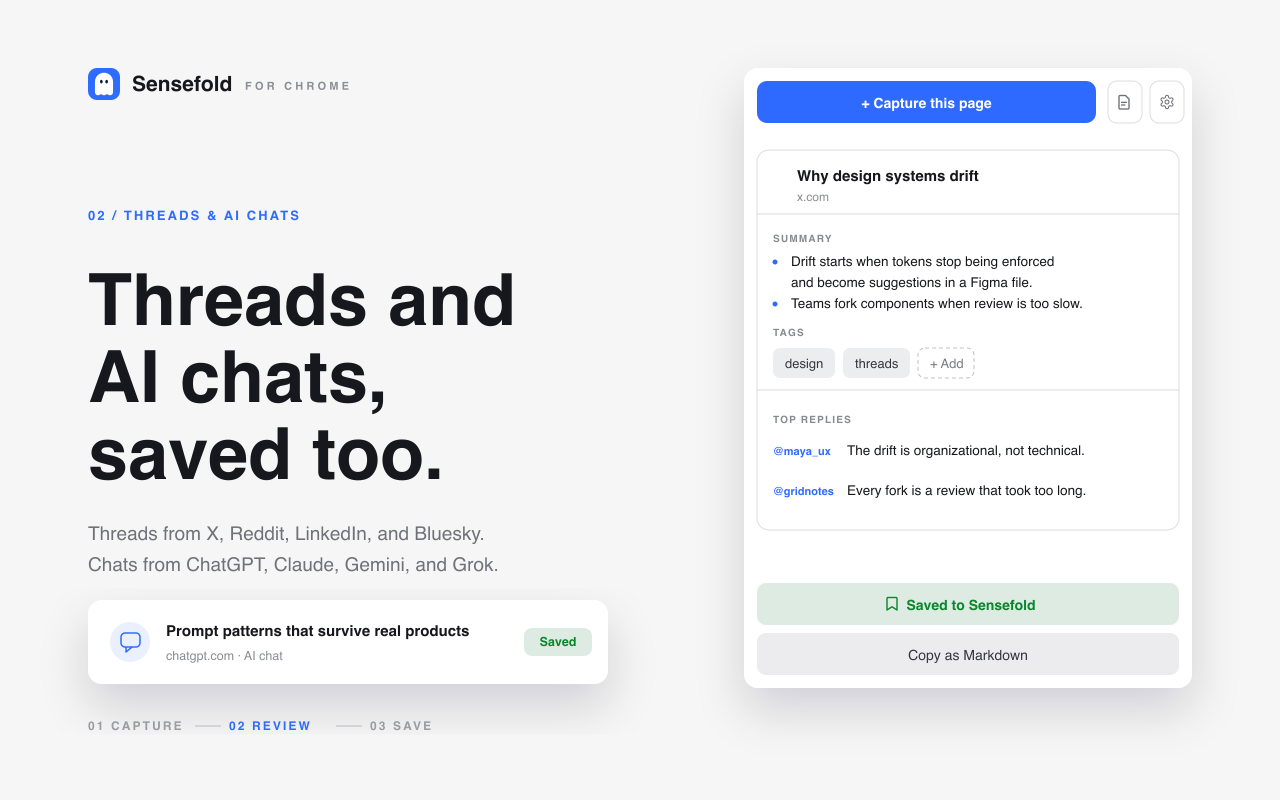
That last item matters more every year. A ChatGPT or Claude conversation where you and the model hashed out a definition is a research artifact, and most tools cannot save it at all. In Sensefold the Chrome extension captures the page you're on, including ChatGPT, Claude, Gemini and Grok chats as speaker-labelled Markdown, X, Reddit and LinkedIn threads with top replies, and YouTube pages with their transcript. The iOS share sheet and the web app cover phone and desktop file drops.
If a tool only works well for pristine text articles, it won't match real life. Real research is scattered across formats.
Enrichment
Enrichment is where the tool stops being storage and starts becoming useful. It reads what you saved, summarizes it, extracts text when needed, tags it, and makes it findable.
Think of this as the difference between putting books in a room and running a real catalog.
| Function | Why it matters |
|---|---|
| Summarization | Gives you (and your AI) a fast entry point into long material |
| Tagging | Creates structure without manual filing |
| OCR and transcripts | Makes screenshots, scans, and videos searchable |
| Full-text and semantic index | Lets a search by meaning find the paragraph, not just the title |
| Preserved original | Lets you verify context later, instead of trusting a detached summary |
The important detail is that this should happen automatically, and only where it should. In Sensefold, every capture (an article, PDF, image, video, thread or AI chat) is summarized and tagged on arrival; PDFs and images are OCR'd and chunked page by page. Your own notes are indexed for search but never rewritten by Sensefold's automatic AI. An agent you authorize can edit a note, but every write is versioned and revertible. Enrichment you have to trigger by hand is enrichment you'll stop using; enrichment that silently edits your writing is worse. And if a system gives you only an AI summary and not the original item, it has created a trust problem.
Recall
Recall is the part you notice most, and it's where the "assistant" actually lives. You ask a question in normal language and get an answer grounded in your saved material, with a link back to the item it came from.
Not "show me all notes with the word regulation."
More like:
- What were the recurring objections across the interviews I saved last month?
- Which papers in my library disagree on this mechanism?
- Find the source where I saved the quote about pricing power.
The catch is who answers. The library itself doesn't need a chat box. It needs a good search that your own AI can call, so the assistant you already pay for (Claude, ChatGPT, Claude Code, Codex, Cursor) reads your sources and writes the answer.
Practical rule: If a tool can save things but your own AI can't read them, it's still a repository, not a research assistant.
Where the Assistant Actually Lives: Your Own AI, Reading Your Context
Search "personal research assistant" today and the results are deep-research products such as Gemini Deep Research, which plan a question, browse dozens of web pages and hand back a report. Those are useful for questions you haven't read anything about yet. They are the opposite of what this article is about, because the sources they read are whoever ranks on the web, not the twelve PDFs, four threads and three chats you already vetted.
A personal research assistant in the sense used here has two halves. The context half is your library: private, normalized to Markdown, enriched on save, searchable by meaning. The reasoning half is whatever AI you already use. The glue between them is the Model Context Protocol, an open standard that lets an AI client call tools on a server, in this case searching and reading your library.
Concretely, in Sensefold your AI connects to https://api.sensefold.app/mcp by pasting one URL and authorizing over OAuth, or with a revocable Agent key scoped to read_only, edit or full access. Once connected it can call search_hub to search the library and get_item to read a full item, and with an edit-tier key it can save_note, update_note and update_tags. Every search result carries a deep link to the saved item and says which section matched (heading path and page range), so the AI can cite what it read and you can open the source yourself. The link opens the item, not a specific page, which is worth knowing if page-level precision is your bar. Claude, ChatGPT, Claude Code, Codex, Cursor, OpenClaw, Hermes and any other MCP client work the same way; the For agents page covers setup and the MCP tools reference lists every tool and tier.
What that changes in daily use: you stop pasting excerpts into chats. You ask Claude Code to check what you saved about a library's API before it writes code. You ask ChatGPT for the disagreements between the three reports you clipped last week, and it quotes them with links. The reading you did stays useful to every AI you use, and it stays yours: the whole library exports as a Markdown ZIP from the web app, and any single capture copies as Markdown from the extension or iOS.
The Workflow: Capture, Synthesize, Verify
Having the assistant is not the same as using it well. Many people open ChatGPT or Claude, ask a broad question, copy a few ideas, and call that research. It helps at the edges, but it doesn't hold up once the work gets serious. The workflow that does hold up has four stages: capture sources into one place, enrich them (which the library does for you), synthesize across the full set with the AI you already use, and validate every important claim against the original. If you skip the middle, the workflow collapses back into digital clutter.
Practical rule: AI should handle repetition. You should handle interpretation.
The machine can summarize, cluster, extract, and retrieve. You still decide whether a paper's methodology is sound, whether a claim is overstated, and whether two sources agree.
Refine the question before you collect
A weak research question produces weak research, even if your tools are excellent. AI is most useful early, when your topic still feels too broad and your terminology is unstable. Start with a rough subject, not a polished thesis, and ask for structure rather than conclusions:
- Map the field: "List the main debates within [topic], and group them into competing schools of thought."
- Find the edges: "What sub-questions would a researcher need to answer before writing about [topic]?"
- Stress-test scope: "Narrow this topic into five researchable questions suitable for a literature review."
- Clarify language: "What terms are often confused in discussions of [topic], and how should they be distinguished?"
Good research prompts specify a subject ("labor market effects of remote work"), a scope ("recent debates in policy and management research"), a task ("group arguments by theme and identify disagreements"), and an output format ("bullet points, evidence separated from speculation"). Bad prompts ask for everything at once; good prompts produce inspectable outputs. AI helps you discover the shape of a field quickly. It still can't decide which sources deserve trust. That's your job.
One habit worth building at this stage: the mapping conversation itself is a source. When ChatGPT or Claude gives you a useful map of a field, save that thread alongside the papers it pointed you to, so you can find it again when you write up your method.
Capture first, organize second
Say you're researching remote work policy. You save a policy paper, a scanned conference handout, a labor economist's YouTube interview, a long analysis article, and the Claude conversation where you first mapped the debate. In a fragmented setup, those items live in different places and behave differently. In one library, each item becomes part of the same context: the scanned handout becomes searchable through OCR, the article and the paper get summarized and tagged on save, the interview arrives with its transcript. Later, when you search "managerial surveillance" or "hybrid productivity measurement," all of them can surface together, and so can the AI you connect.
If YouTube lectures are a big part of your input, the transcript-first way to summarize a YouTube video covers that source type; for dense documents, how to search and summarize PDF files covers OCR and first-pass reading.
Synthesize across the library, not one document at a time
The first gain comes from summarization at scale: read the short summaries of many items before you commit to reading a few in full. That's usually enough to separate background material from core evidence. The productivity gain doesn't come from replacing reading. It comes from reading in the right order.
Once your library has enough material, switch from document-level prompts to synthesis prompts, asked of the AI that is connected to your library:
- Comparison: "Compare how these sources define platform risk."
- Disagreement: "Where do these authors conflict on the cause of supply chain instability?"
- Pattern: "What themes recur across these sources?"
- Gap: "Which claims appear repeatedly but lack direct evidence in my saved sources?"
- Chronology: "How has the argument about AI governance changed across these materials over time?"
Synthesis works best in three passes: orientation (the main themes across the library), tension finding (where the sources disagree, hedge, or rely on different assumptions), and extraction (the claims worth checking directly before drafting). A good synthesis should point you back to the underlying materials; if it doesn't cite the specific saved items it relied on, treat the answer as unstable. With an edit-tier key, the same assistant can write its synthesis back into your library as a note, next to the sources it drew from, and every agent write is versioned so you can review or revert it.
The best synthesis prompt isn't "tell me what these sources say." It's "show me where these sources converge, diverge, and leave gaps."
Verify before you cite
This is the line that separates useful AI-assisted research from polished nonsense. AI can sound confident while being wrong, and it can fabricate citations that look real enough to survive a quick glance: a 2023 study in Scientific Reports found that a majority of the references ChatGPT generated on its own were fabricated or wrong. Journals and institutions increasingly expect disclosure of AI use as well: the ICMJE recommendations require authors to disclose AI-assisted technologies and forbid listing them as authors, and Nature portfolio's editorial policy takes the same position.
If you remember one rule, make it this one: never cite an AI output directly unless you've checked the underlying source yourself. Use a verification loop simple enough that you'll follow it:
- Check the claim. Is the statement specific enough to verify, or is it vague filler?
- Open the original source. Don't rely on the summary alone.
- Match wording to evidence. Does the source really support the claim as stated?
- Check surrounding context. A true sentence can still be used misleadingly.
- Record the source path. Keep the original item attached to the note, quote, or synthesis, so you can retrace how you got there two weeks later.
Some behaviors should trigger instant skepticism: too-perfect citations you can't find in a database, specific statistics with no attached source path, claims that collapse a complicated paper into a simple verdict, confident summaries of material the model did not ingest, and secondary retellings that never quote or point to the primary text. When the AI answers from the items it read in your own library over MCP, every claim has a source you can open, which is a much safer footing than open-web generation; the reasoning behind that design is in why answers from your own library must keep source citations.
Automate the unseen work, not the judgment
Research includes a lot of mechanical labor: pulling text out of scanned pages, first-pass summaries, tagging and filing, cleaning rough notes, hunting down the quote you know you saved somewhere. None of it is intellectually difficult; it's just expensive in attention. A few patterns hold up consistently:
- Works well unsupervised: OCR, first-pass summaries, tagging, rough categorization. A good library does these on ingest.
- Works with supervision: cleaning messy text, extracting themes, formatting source lists, tidying tags through an agent with edit access, then reviewing the diff.
- Fails when unsupervised: generating citations from memory, asserting exact facts without source grounding, making methodological judgments for you.
The more "back office" the task, the safer automation is. The closer it gets to claims, evidence, or interpretation, the more human oversight has to rise. Automate capture and enrichment, partially automate synthesis, never fully automate validation.
How Professionals Use a Personal Research Assistant
The most useful way to judge a personal research assistant is to watch what it changes in daily work. Not the demo. The routine.
The student building a thesis trail
A student's problem usually isn't lack of material. It's fragmentation. Lecture slides live in one place, papers in another, reading notes in another, and explanatory videos somewhere else entirely.
A good setup lets the student save all of it into one library, then point the AI they already write with at that library. Instead of rereading every source before drafting, they ask for the main disagreements between the saved papers, or a summary of how a concept changed across the reading list, and check each answer against the linked item. The quality of the work still depends on judgment, but the retrieval burden drops sharply, and a scanned handout, a dense journal article, and a video transcript can all contribute to one argument.
The writer who works across formats
Writers rarely research in a straight line. They collect articles, interview transcripts, images, clips, PDF reports, and odd fragments that may or may not become useful later.
The value of a personal research assistant here is pattern detection. A writer can ask their AI, "What themes keep recurring across these interviews?" or "Pull the saved items that mention the same tension in different language." That's very different from searching a folder of notes. What works well for writers is source-linked answers, cross-format search so screenshots and transcripts don't become dead ends, and fast summaries for re-entering a topic after time away. What doesn't work is forcing every input into a manual template first. That kills momentum.
The researcher managing depth, not just volume
Researchers don't just need storage. They need comparison, contradiction, and continuity. The hard part isn't saving a paper. It's remembering how it relates to ten others you read over six weeks. That's where the assistant becomes a serious workflow tool: dense reading stays in motion, side-by-side synthesis is one question away, and prior context comes back without being rebuilt from scratch every time.
The operator inside a noisy job
A lot of people who need this most don't call themselves researchers. Product marketers, consultants, founders, policy staff, journalists, and analysts all run on ongoing reading and synthesis: tracking moving topics across articles, decks, reports, and chats, reusing prior context instead of starting from zero every week, and answering specific questions quickly with enough traceability to trust the answer. That's where a personal research assistant earns its place. It shortens the distance between "I know I saved that" and "here's the exact thing, plus how it connects to the rest."
Key Criteria for Selecting the Right Tool
The wrong tool is often chosen for one simple reason: comparing features instead of evaluating workflow fit.
A personal research assistant becomes central very quickly if it's good. If it's bad, it becomes one more abandoned archive. So the selection criteria need to be stricter than "has AI" or "supports PDFs."
Ask how private the library really is
Your saved library is often your intellectual property. It may include unfinished ideas, reading trails, interview notes, or client material. Privacy isn't a bonus setting. It's part of whether the product is usable for serious work.
Look for clear answers to these questions:
- Is the library private by default?
- Can you export your data, in a format you can read without the product?
- Does the tool preserve originals alongside AI-generated layers?
- Does the automatic AI rewrite your own notes, or only index them?
- Can you scope and revoke what an agent is allowed to do?
A vague privacy page is usually a warning sign. The stronger signal is a tool that names its infrastructure outright. Sensefold, for instance, publishes every third-party processor it relies on, including the services that parse PDFs and generate summaries, on a public subprocessors page, and its privacy policy states that those processors are contractually prohibited from training on your content. You can see exactly where your files go before you commit a library to it. For sensitive interviews, internal documents, or unpublished materials, follow your institution's rules first.
Test search before you trust anything else
Search quality reveals the maturity of the product faster than almost any other feature, and it's the same search your AI will be calling. Don't test only exact titles. Test the messy middle.
Search for:
- a concept described in different words
- a phrase you remember imperfectly
- text inside a screenshot or scanned PDF
- a topic that spans several saved formats
If results come back brittle, shallow, or heavily dependent on exact wording, you'll feel that failure every day, and so will your AI.
Check format support and citation behavior
A lot of tools look strong until your workflow leaves plain text. Then things fall apart.
Use this quick evaluation table:
| Question | Strong answer | Weak answer |
|---|---|---|
| Can it handle mixed media? | Works across links, PDFs, images, notes, threads, and transcripts | Primarily built for web pages only |
| Can my own AI read it? | Exposes search and read tools over an open protocol such as MCP | Only its own built-in AI can see the library |
| Does an answer point back to a saved item? | Search results carry a link to the specific item and the section that matched | Generic summaries with no trace |
| Does it preserve source context? | Opens the original item easily | Abstracts everything into detached snippets |
| Can it support project-based retrieval? | Tags and search that narrow to a subset | One undifferentiated pile |
Citation quality matters more than polished output. A neat answer you can't verify is just a smoother form of guesswork. Answers grounded in items you saved, with a link to each, are the fix.
Match the pricing model to your behavior
Some people save constantly and query lightly. Others save selectively but run deep synthesis often. Those are different usage patterns, and pricing models don't suit them equally well.
Think about:
- Your capture volume across a normal week
- Whether AI usage is metered, and which operations are
- What happens when you exceed limits
- Whether a trial lets you run a real project before you pay
In Sensefold's case, saving is free and AI processing runs on credits: the summaries, tags, OCR and transcripts that run on each capture spend them, while searching and reading over MCP do not. Monthly credits reset each billing period and don't roll over; a one-time credit pack covers overflow and never expires. New subscriptions start with a 14-day free trial (card required, charged when the trial ends, cancel anytime). The pricing page has the current plans.
The right choice is rarely the tool with the longest checklist. It's the one that fits your actual habits without making you think about the software all day.
Research Assistants vs Note-Taking Apps
A lot of confusion comes from comparing a personal research assistant to tools like Notion, Obsidian, Evernote, Apple Notes, or Google Keep as if they're solving the same problem. They overlap, but their center of gravity is different.
A note-taking app is built for creating and organizing your own material. A personal research assistant is built for retrieving material across a library of sources, for you and for your AI.
Different jobs, different defaults
If you open a note-taking app, the basic object is usually a blank page. You write into it, structure it, and link it manually. That's great for drafting, journaling, planning, and personal knowledge work that starts with your own writing.
If you open a research assistant, the basic object is a source item. The software assumes you are collecting, enriching, and searching material that already exists.
People who are trying to improve how they organize notes often discover this the hard way. Better note structure doesn't automatically solve research retrieval. You can have beautifully organized notes and still be unable to answer, "What did the last five sources say about this exact issue?" (If what you are after is the broader setup, one library that every AI you use can read and write back to, the step-by-step is in how to build an AI second brain.)
Where each one wins
Traditional note apps still matter. They're better for drafting original writing, building custom structures and dashboards, manual linking between your own concepts, and long-form project planning. They're good workbenches.
Research assistants pull ahead when the task is synthesis across saved material: summarizing, finding supporting or conflicting evidence, and searching across mixed formats by meaning, with your own AI doing the reasoning over what the search returns. That ability to put a whole library in front of the model you're working with is what separates a research assistant from passive storage.
The practical answer for many people isn't either-or. It's both. Notes remain the workspace. The personal research assistant is the context the AI reads while you work in it. The broader upkeep rules that keep such a library useful over years are in knowledge management best practices.
Frequently Asked Questions About Personal Research Assistants
Is this a deep-research agent?
No. A deep-research agent such as Gemini Deep Research or ChatGPT's deep research browses the open web for you and writes a report from what it finds. A personal research assistant in this article's sense reads only what you saved, and it is your own AI doing the reading. The two are complementary: use a deep-research run to discover sources, save the ones worth keeping, and from then on your assistant works from those.
Can my own AI (Claude or ChatGPT) use my saved research?
Yes, if the library exposes itself over an open protocol. Sensefold runs an MCP server at https://api.sensefold.app/mcp; Claude, ChatGPT, Claude Code, Codex, Cursor and any other MCP client connect by pasting the URL and authorizing, or with a revocable Agent key. The AI then searches and reads your items directly, and each result links back to the saved source. Setup is on the For agents page.
Can I trust AI summaries of papers and reports?
For triage, yes. As final representations, no, not without checking the original. A good summary tells you whether something is worth reading in full; it does not relieve you of reading the methods section, the limitations, and any sentence carrying an exact claim. Many tools also summarize from a truncated slice of long documents. Sensefold's automatic summary reads the first portion of the extracted text, not every page, which is fine for triage and exactly why it shouldn't be your only reading.
How do I avoid hallucinated citations?
Don't ask a general chatbot to generate your bibliography from memory. Save or locate the original source first, ask the AI to summarize only from that source, require a source path back to the original file, article, or transcript, and manually confirm title, author, date, and publication details before citing. If a citation can't be opened, verified, and matched to the claim, don't use it.
Is using AI for research considered cheating?
That depends on the context and on what you let the tool do. Using AI to summarize, organize, and compare sources is usually a workflow decision. Using it to fabricate citations, hide your process, or submit generated analysis as your own independent work crosses into misconduct. When in doubt, disclose your use of AI, especially in academic or institutional settings, and follow your field's formal guidance over your own instincts.
Is this just a smarter bookmarking app?
No. A bookmarking app stores pointers. A personal research assistant keeps the content, makes it searchable across formats, and lets the AI you already use read it. The difference is enrichment plus agent access, not just storage.
Do I need to pay before I can test it?
Not for a real test. In Sensefold, saving is free and only AI processing spends credits; new subscriptions start with a 14-day free trial that requires a card and can be cancelled anytime. Whatever tool you evaluate, judge it on a live project: strong search, automatic summaries, support for messy inputs like PDFs or screenshots, and whether your own AI can read the result. If those pieces are missing, you're testing a link locker, not a research workflow.
How much setup does it take?
Less than people expect if you start with a single live project. Don't begin by migrating your whole digital life. Start with one thesis, one report, one writing assignment, or one topic you're actively tracking. Save into that library for a week, connect the AI you already use, and ask it real questions.
Can it help me find research gaps?
Indirectly, yes. Because everything you saved sits in one searchable library your AI can read, you can ask questions no folder answers: "What am I missing on this topic based on what I've saved?" or "Where do my sources disagree?" It won't invent a literature review you didn't do, but it does let you inspect your own reading as a whole, which is usually impossible when it's scattered across five apps.
Will it replace my own judgment?
No. It should reduce retrieval work, accelerate synthesis, and surface connections you might miss. You still decide what matters, what's credible, and what belongs in your final work.
If you want a practical place to try this workflow, Sensefold is built as personal context for every AI you use: capture widely with the extension, iOS and web app, get summaries, tags and OCR automatically on every capture, and let Claude, ChatGPT, Codex or any MCP client search and cite your own private library. It's especially useful if your research lives across links, PDFs, notes, threads, YouTube videos and past AI chats, and you want one library that every AI you work with can read.