Sensefold apps
One library, every device you work on.
Sensefold is one library with four doors: a Chrome extension, an iPhone and iPad app, the web app, and a Mac app. Save from whichever one is in front of you and it is on the others a moment later, in realtime. Everything becomes Markdown you own, and the same library is readable and writable by your own AI over MCP.
- One account, one library, realtime sync
- Markdown everywhere, whole-library export
- Free apps; saving is free, AI runs on credits
Pick the door you use most
Each app is built for the place you are in when something is worth keeping: the browser tab, the share sheet, the desk. None of them holds a separate copy of your library.
Illustration, drawn from the real panel. Chrome extension
ChromeChrome Web Store · v1.3.0
One click on the page you have open. Articles, X and Reddit threads with their replies, YouTube pages with the transcript, and ChatGPT, Claude, Gemini, or Grok conversations as speaker-labelled Markdown. You review the summary and tags in the side panel, then save.
- The only capture path for AI chats
- Highlights and quoted comments, per site
- Copy as Markdown from the panel
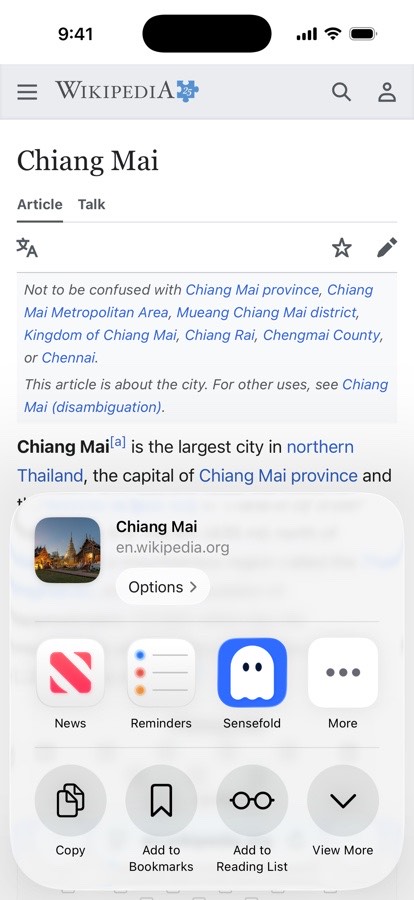
iPhone & iPad
iOS · iPadOSApp Store · v1.7.0
Sensefold sits in the share sheet of every app on your phone and tablet. Share a link, a PDF, a photo, a Word or PowerPoint file, or a paragraph of text, add a comment as you save, and it lands in your library with a summary, tags, and searchable text.
- Share sheet capture from any app
- Comment on the item as you save it
- Copy as Markdown from the item menu
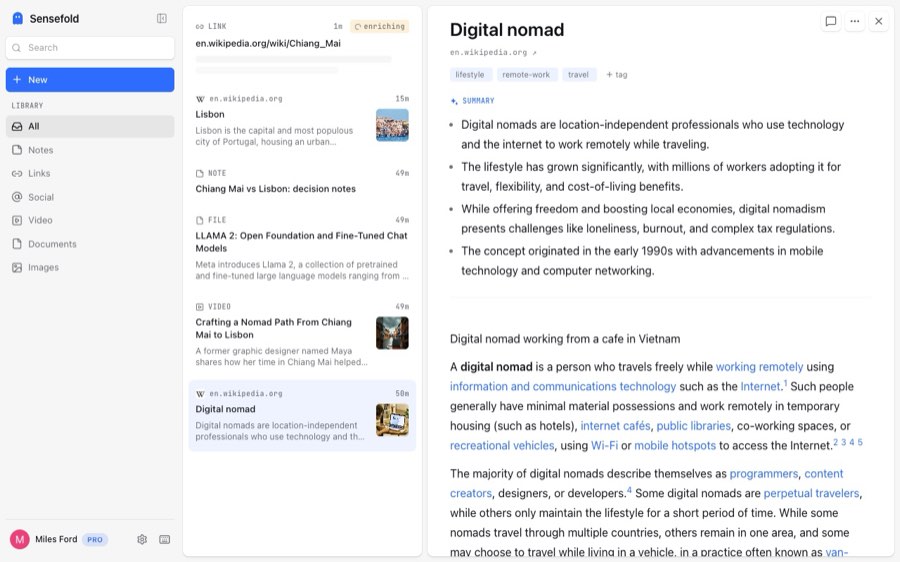
Web app
Browserapp.sensefold.app · any modern browser
Where the library lives. Search everything you have saved on any device, keyword and semantic at once. Write notes in a rich editor that stays Markdown underneath, comment and highlight, and read the version history of anything an agent has touched.
- Whole-library export as a Markdown ZIP
- You → For agents: OAuth connections and Agent keys
- Paste or drop a URL, an image, or a PDF to save it
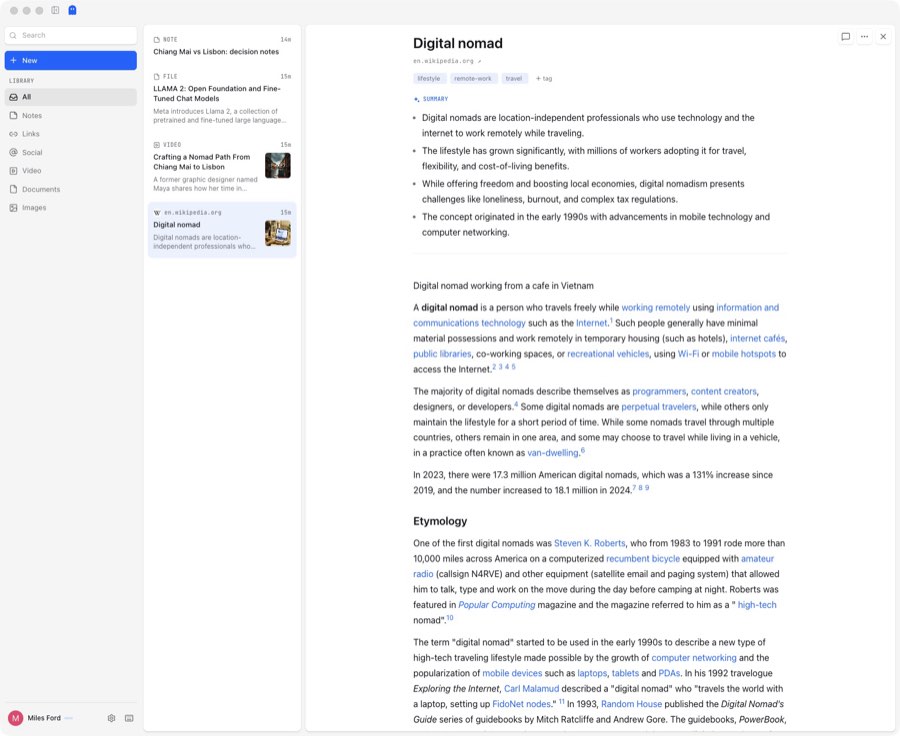
macOS (Apple Silicon)
macOS 12+ · Apple SiliconDirect download · v0.7.0
The web app in a native window for M-series Macs: the same library, the same sign-in, the same features, plus a Dock icon, a window that remembers its place, and updates that install themselves. Requires macOS 12 or later on Apple Silicon.
- Automatic updates, downloaded only when you say so
- sensefold:// links open the app at an item or a page under You
- YouTube plays inside the app, with transcript seek
Where your AI comes in
The apps are how you fill the library. Your AI is how you use it. Connect Claude, ChatGPT, Claude Code, Codex, Cursor, or any MCP client to https://api.sensefold.app/mcp and it can search what you saved from any device, read the items, cite them by deep link, and, with the permission tier you choose, write notes back. Every agent edit is versioned and revertible, and reads never spend credits. Setup takes one URL and an authorization, or a revocable Agent key from the web app; the details are on Sensefold for agents.
Frequently asked questions
Is there an Android or Windows app?
No. Today Sensefold ships a Chrome extension, an iPhone and iPad app, a web app, and a macOS app for Apple Silicon. On Android, Windows, or Linux, the web app at app.sensefold.app runs in any modern browser with the full library, search, notes, and export, and the Chrome extension installs in Chrome on Windows and Linux for capture.
Does the Mac app need the web app?
No. The Mac app is the web app in a native window: it signs in with the same account, shows the same library, and has every feature the web app has. Nothing is stored only on the Mac, so you can use either one, or both, and switch at any time.
Do I need every app?
No. One account, one library; each app is a door into it. Most people use the Chrome extension for pages and AI chats, the phone for anything that comes through the share sheet, and the web app or the Mac app for reading, search, notes, export, and connecting their AI. Whatever you save from one is on the others a moment later.
Is any of this extra cost?
All four apps are free to install, and saving to your library is free from any of them. AI work on what you save (summaries, tags, OCR, transcripts) runs on credits that come with a Starter or Pro plan, and every new subscription starts with a 14-day free trial with a card on file. There is no per-device or per-app price, and reading your library over MCP never spends credits.
What works where is laid out in the capabilities table; plans and the credit pack are on the pricing page.