Everything you read lands somewhere different.
The article is in a tab, the thread is bookmarked on X, the PDF is in Downloads, the idea is a screenshot, the conclusion is in a chat you closed. Each app holds a piece. None holds the picture.
Your personal context
The articles, chats, and notes you keep, in one Markdown library that Claude, ChatGPT, and Cursor read — and write back to.
The article is in a tab, the thread is bookmarked on X, the PDF is in Downloads, the idea is a screenshot, the conclusion is in a chat you closed. Each app holds a piece. None holds the picture.
The comparison you did last week, the paper you highlighted, the talk you skimmed: none of it is in the window where you are asking the question. So you paste, summarize, and explain it all again.
Built-in memory belongs to one vendor and lives in one app; you cannot read or edit it, and Hermes, Cursor, or Claude Code never see it. Switch tools or start a new session, and your thinking starts over.
Sensefold is your personal context: the articles, threads, videos, and AI conversations you collect, the notes you write on them, and one Markdown library that Claude, ChatGPT, and Cursor all read, build on, and write back to — so your thinking carries across models and sessions. Here is what a week with it looks like.
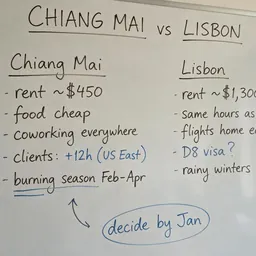
In ChatGPT, comparing Chiang Mai and Lisbon for a year of remote work. One click in the Sensefold side panel saves the whole conversation as speaker-labelled Markdown, with a summary and tags. Two articles and a 40-minute talk follow; the talk arrives with its transcript. On the phone, the share sheet does the same from any app.
Back in the library, the talk's transcript jumps to the minute about rent. A highlight on the paragraph that matters, a comment next to it, and a short note written that evening, sitting beside its sources. Sensefold's automatic AI summarizes and tags what you save; it never rewrites a word you wrote.
In Claude: "Based on what I collected this week, which city is cheaper for my setup?" Claude reads the conversation, both articles, and the highlight, then writes a "Decision draft" note back into the library, versioned and revertible. On Saturday, Cursor opens the moving checklist and the draft is already there.
https://api.sensefold.app/mcpSample content. Every screen is drawn from the real product.
Every item is Markdown. Copy any one from the extension or the phone.
Export the whole library as a Markdown ZIP from the web app, any time.
Sensefold's automatic AI never rewrites what you wrote. Agents you authorize can edit, and every edit can be reverted.
AI processing serves only your own library. Every key and OAuth connection is listed under You → For agents and stops working the moment you revoke it.
Starter and Pro: 14-day free trial · 800 AI credits included · Card required · Charged when the trial ends · Cancel anytime.
See full pricing →Sensefold is your personal context: the articles, threads, videos, and AI conversations you collect, the notes you write on them, and one Markdown library that Claude, ChatGPT, and Cursor all read, build on, and write back to — so your thinking carries across models and sessions. Sensefold has no chat of its own — the AI you already use does the answering — and you can export the whole library as a Markdown ZIP anytime.
Claude, ChatGPT, OpenClaw, Hermes, Claude Code, Codex, and Cursor by name — plus any MCP client. Paste one URL and authorize, or use a revocable Agent key.
With the Chrome extension, one click on an open ChatGPT, Claude, Gemini, or Grok conversation saves it as clean, speaker-labelled Markdown in your library.
Search, read, save, and update items in your library. You pick a permission tier — read-only, edit, or full access. Every edit is versioned so you can review and revert it, and a deleted item goes to the recycle bin where you can restore it.
Notes are Markdown-native, and Sensefold’s automatic AI never rewrites them — only agents you authorize can edit them, versioned and revertible. Export your whole library as a Markdown ZIP from the web app anytime, copy any capture as Markdown from the extension or the iOS app, and your agents can read everything over MCP.
No. AI processing — summaries, tags, transcripts — serves only your own library. We never train models on your data or sell it.
On the web, on iPhone and iPad, as a Chrome extension, and on Apple Silicon Macs. Your library syncs across all of them.
Starter is $16/month ($160/year) with 7,000 AI credits a month and 2 GB of storage; Pro is $36/month ($396/year) with 20,000 credits and 20 GB. New subscriptions start with a 14-day free trial including 800 credits — a card is required, it charges when the trial ends, and you can cancel anytime. Saving items is free; credits pay for the AI work, reset each billing period, and do not roll over. A one-time 5,000-credit pack is $16, never expires, and anyone can buy one. Monthly plans and the credit pack cost the same on the web and in the App Store. Annual plans on the App Store are $159.99 (Starter) and $399 (Pro) because of Apple's price tiers.
Built-in memory belongs to one vendor, lives inside one app, and you cannot read, edit, or export it. Sensefold is a Markdown library you own; Claude, ChatGPT, Cursor, and any MCP client read and write the same copy, every write is versioned, and you can revoke any of them.
| Built-in memory | Sensefold | |
|---|---|---|
| Readable by you | No | Yes |
| Editable by you | No | Yes |
| Shared across AIs | No | Yes |
| Exportable | No | Yes |
No. The Chrome extension, the phone, and the web app need nothing technical, and Claude and ChatGPT connect by pasting one address. Claude Code, Codex, and Cursor have their own two-minute guides.
Yes. Saving is free, and the reader, transcripts, highlights, comments, and search are all there without connecting any AI. AI processing (summaries, tags, OCR) runs on credits.
Saving is free. AI runs on credits. 14-day trial, cancel anytime.
 Hermes
 OpenClaw