For agents
Connect Claude, ChatGPT, or any MCP client to everything you've saved.
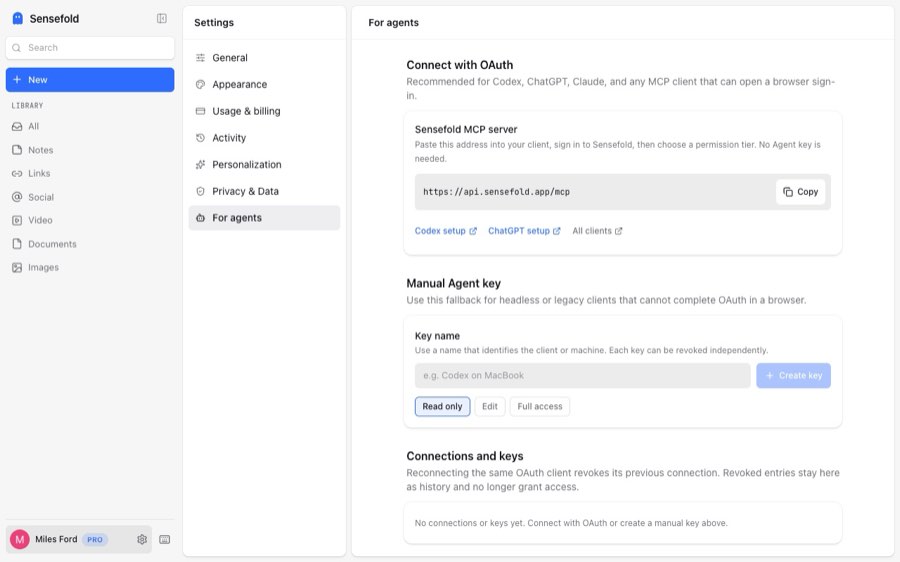
Sensefold is your personal context: the articles, threads, videos, and AI conversations you collect, the notes you write on them, and one Markdown library that Claude, ChatGPT, and Cursor all read, build on, and write back to. The way in is a remote MCP server at https://api.sensefold.app/mcp: paste that one address into your AI, authorize in the browser, and it can search, read, and (if you allow it) write that library. Two minutes, no key to manage.
- Claude
- ChatGPT
- Claude Code
- Codex
- Cursor
- OpenClaw
- Hermes
- + any MCP client
 OpenClaw
 Hermes
What your agent can read
Everything you capture lands in one private library as Markdown, so an agent never has to parse a web page, a PDF, or a chat transcript itself:
- Articles and newsletters clipped from any page, with an automatic summary and tags.
- Threads from X, Reddit, LinkedIn, Threads, Bluesky, and Hacker News, comments included.
- YouTube videos with the transcript and a chapter guide.
- PDFs and images with OCR, so scanned pages and screenshots are searchable text.
- Your own notes, indexed for search and never rewritten by Sensefold's automatic enrichment. Agents you authorize can edit them, versioned and revertible.
- Saved AI conversations from ChatGPT, Claude, Gemini, and Grok, captured by the Chrome extension as speaker-labelled Markdown.
Search is hybrid, keyword and semantic, and cross-lingual: a question asked in English finds the Chinese thread you saved last month. Each result carries a link back to the item, which the agent can cite. The full source matrix lives in the capability docs.
Connect in two minutes
Copy the MCP address
https://api.sensefold.app/mcpAdd it inside your AI, not in Sensefold
Each client has its own "add MCP server" menu. There is nothing to create in Sensefold first.
- Claude: Customize → Connectors → Add custom connector.
- ChatGPT: Settings → Security and login → Developer mode, then add a connection.
- Claude Code:
claude mcp add --transport http sensefold https://api.sensefold.app/mcp, then/mcp→ Authenticate. - Codex:
codex mcp add sensefold --url https://api.sensefold.app/mcpthencodex mcp login sensefold. - Cursor: Customize → MCPs → New MCP server, then Connect.
Sign in when your AI asks, and pick a tier
Claude, ChatGPT, Claude Code, Codex, Cursor, OpenClaw, and Hermes open a browser for this step: sign in to Sensefold, choose a tier, done. The connection appears under You → For agents, where you can revoke it. Agent keys are only for headless or CI clients that cannot open a browser; keep one in SENSEFOLD_AGENT_KEY, never in a project file or a chat message.
read_onlyeditfullOr let your agent set itself up
Give this prompt to your agent. It reads the setup guide and configures the MCP connection with you. No download or skill installation required.
Read https://sensefold.app/for-agents/skill.md and help me connect Sensefold.Setup by client
The address is the same everywhere; only the menu differs. Each client below has a step-by-step guide in the docs.
Claude.ai and Claude Desktop
Open Customize → Connectors → Add custom connector, paste the Sensefold address, and click Add. Claude opens the browser for sign-in; pick a permission tier on the consent screen. No key to create. Claude can then search your saved articles and threads, read a note by title, and save a conversation's conclusions back as a new note.
Full guide →Claude Code
Run claude mcp add --transport http sensefold https://api.sensefold.app/mcp, then type /mcp and choose Authenticate to finish OAuth in the browser. On a headless or CI machine, pass --header "Authorization: Bearer $SENSEFOLD_AGENT_KEY" with a revocable Agent key instead. Read tools carry a read-only hint, so searches run without a confirmation prompt.
ChatGPT
Turn on Developer mode under Settings → Security and login, then add Sensefold as a connection with the MCP address. ChatGPT authorizes over OAuth and uses the search and fetch aliases to ground answers in your library. ChatGPT web keeps its own connection list, separate from Codex.
Codex
In the Codex app, open Settings → MCP servers → Add server, choose Streamable HTTP, paste the address, restart, and select Authenticate. From the CLI: codex mcp add sensefold --url https://api.sensefold.app/mcp then codex mcp login sensefold. The app, CLI, and IDE extension share one configuration per machine.
Cursor
Open Customize → MCPs → New MCP server and add an entry whose url is the Sensefold address. Cursor prompts you to sign in; the tool count under Connected then shows the tier. If you prefer a key, add an Authorization header that reads it from an environment variable rather than pasting the key into the file.
OpenClaw
Register the server with openclaw mcp add sensefold --url https://api.sensefold.app/mcp --transport streamable-http --auth oauth --no-probe, then run openclaw mcp login sensefold and approve access in the browser. If the callback page does not load, copy the code parameter and finish with openclaw mcp login sensefold --code. Verify with openclaw mcp doctor sensefold --probe.
Hermes Agent
Run hermes mcp add sensefold --url https://api.sensefold.app/mcp --auth oauth, approve the connection in the browser, and enable the discovered tools. hermes mcp test sensefold confirms the connection. A remote Hermes gateway cannot receive the loopback callback; use its remote OAuth helper or an Agent key there.
Other MCP clients
Any client that speaks Streamable HTTP can connect. OAuth 2.1 clients discover the authorization server and register themselves; no client ID to pre-register. Clients that only support static headers send Authorization: Bearer with an Agent key. VS Code takes the same JSON entry as Claude Code in .vscode/mcp.json; MCP Inspector is a quick way to check the tool list. See the MCP tools reference for the exact schemas, the VS Code guide and the any-MCP-client guide for setup, and troubleshooting if a connection fails.
Or install from a directory
If your client browses a directory, Sensefold is listed in the ones it searches. Same endpoint, same tools; a directory only saves the paste. Config snippets and worked examples live in the GitHub repository.
The security model
OAuth first. A browser client authorizes over OAuth 2.1 and gets a connection you can see and revoke under You → For agents; revoked rows stay visible as history but grant nothing. Agent keys cover the headless case: created there with a tier, shown once, prefixed lexi_agent_v1_, revocable and rotatable.
Tiers shape what the agent sees. read_only connections list seven tools, edit eleven, and full twelve. The list is only the visible half: every call is checked against the tier on the server.
Writes are versioned. update_note and update_tags create a revision you can diff and revert from the item's history. Saves and deletes are logged in Activity; a delete goes to the recycle bin and can be restored. Updates and deletes must send the expectedVersion from a fresh read, so two agents cannot silently overwrite each other.
Your notes stay yours. Automatic enrichment summarizes and tags captures but never rewrites a note you authored. Only an agent with an edit tier can change one, and you can undo it.
Tools your agent can call
Ten tools across three tiers, plus two read-only aliases. Self-check after connecting: the client's tool list shows 7 tools for read-only, 11 for edit, 12 for full.
| Tool | Tier | What it does |
|---|---|---|
search_hub | read_only | Search everything you have saved by meaning and keywords. Cross-lingual: queries may be English, Chinese, or mixed. |
list_items | read_only | Browse recent saves, or filter by date and source. |
get_item | read_only | Read one item as clean Markdown text, in windows or by matched section. |
get_quota | read_only | Check your plan, credit balance, and limits. |
list_share_pages | read_only | List your share pages, so search and list_items can stay within one. Read only. |
save_link | edit | Save a URL; summary, tags, and OCR run after capture. |
save_note | edit | Write a new note into your library, stored verbatim. |
update_note | edit | Replace an item's text. Revision-backed: diff and revert from the item's history. |
update_tags | edit | Replace your own tags on an item; AI tags are untouched. Revision-backed: diff and revert from the item's history. |
delete_item | full | Move an item to the recycle bin. You can restore it. |
search / fetch | read_only | Aliases following the ChatGPT connector contract; they map onto search_hub and get_item. |
Schemas, the retry contract, and the permission matrix: MCP tools reference →
Example prompts
Talk to your AI as usual; it decides when to call Sensefold. Worked example.
Search my Sensefold library for everything I saved about pricing models, read the three most relevant items, and summarize the trade-offs before we design ours.
Find the ChatGPT conversation I saved last week about choosing a city to move to, read it, and continue from its open questions.
Save a note titled "Sync layer decisions, September" with the conclusions of this thread, tagged architecture and decisions.
Credits and limits
MCP access is included in Starter and Pro. There is no separate agent plan or seat, and no per-agent limit on connections. Saving is free; AI processing runs on credits, so an agent save spends credits the same way a save from the app or the extension does. get_quota returns the plan, the remaining credits, and storage, so an agent can check before a batch of saves. Plans and the credit pack are on the pricing page.
Frequently asked questions
What is the Sensefold MCP server URL?
https://api.sensefold.app/mcp. It is a remote Streamable HTTP server, so there is nothing to install or run locally. Paste it into any MCP client that supports remote servers, or send a Bearer Agent key in the Authorization header.
How do I connect Claude to my saved articles and notes?
In Claude, open Customize → Connectors → Add custom connector, paste the Sensefold MCP address, and complete the OAuth sign-in. Claude Code uses claude mcp add --transport http followed by the /mcp Authenticate step. Either way Claude can then search, read, and (with an edit tier) write your library.
Does Sensefold work with ChatGPT?
Yes. ChatGPT adds Sensefold as a remote MCP connection in Developer mode, authorizes over OAuth, and uses the search and fetch tools to ground answers in what you have saved. Codex connects with codex mcp add and codex mcp login.
Can Cursor or Claude Code read my notes?
Yes. Both are MCP clients. With a read_only tier they can search and read every item, including your own notes; with an edit tier they can save and update them, and every update is versioned and revertible.
Do I need an API key?
No. Clients with a browser authorize over OAuth 2.1, which creates a revocable connection under You → For agents. Agent keys exist for headless and CI machines: created on the same page, shown once, revocable and rotatable.
Is it safe to give an agent write access?
Write access is scoped and reversible. The tool list is shaped by the tier and every call is checked against it on the server. update_note and update_tags are revision-backed, saves and deletes are logged in Activity, a delete goes to the recycle bin, and concurrent edits are guarded by an expectedVersion check. You can revoke any connection from You → For agents.
Does connecting an agent cost extra?
No. MCP access is included in Starter and Pro; there is no separate agent plan or seat. An agent save runs the same enrichment as a save from the app, so it spends credits the same way, and get_quota reports the balance.