Build an AI second brain your Claude or ChatGPT can actually use
Build a second brain your AI can use: capture everything into one library, let summaries and tags do the filing, then connect Claude or ChatGPT to it over MCP.
On this page
- Where saved things go to disappear
- 1. Capture into one library, from wherever you are
- 2. Let enrichment do the filing
- 3. Connect the AI you already use over MCP
- Walkthrough: a first marathon, end to end
- Save the ChatGPT conversation
- Save the threads and the videos
- Keep a short log
- Ask Claude about it
- Have Claude write it back
- Choosing the library
- Frequently asked questions
- How is an AI second brain different from a notes app?
- Do I need to code?
- Is my data safe and private?
- Which AIs work with it?
- Can I build an AI second brain with Obsidian or Claude Code instead?
- What does it cost?
An AI second brain only works if two things are true: everything you keep lands in one place, and the AI you already use can read that place without you pasting into it. Most setups fail the first test by spreading saves across five apps, and fail the second because the library is a dead end for Claude or ChatGPT. The fix is three moves, in this order: capture into one library from wherever you are, let automatic summaries and tags do the filing you would never do by hand, and connect your AI to the library over MCP so it can search, read, and write notes back. This guide walks through each move, then runs a complete example end to end.
Where saved things go to disappear
Say you signed up for your first marathon, sixteen weeks out, and you have never run further than a half. You do what everyone does now. You ask ChatGPT for a 16-week plan that keeps injury risk low, and it builds you a good one. You save a Reddit thread on cadence and shin splints, and a couple of YouTube videos on the same thing. Every week you jot a short training log: what you ran, how it felt, what you are wondering about.
In week ten your right shin is tender after a 26 km long run, and your draft for week 12 has a 30 km run in it. You open Claude, because that is where you think things through now. Claude has never seen any of it. The plan is somewhere in a sidebar of forty chats. The thread and the videos are tabs you closed. The logs are in a notes app. You spend the first twenty minutes reconstructing what you already learned, pasting excerpts, and explaining your training again. The research was done. It just was not anywhere your AI could reach.
The problem is storage before it is AI. Two conditions fix it: one library, and an AI that can read it.
1. Capture into one library, from wherever you are
The first rule is boring and non-negotiable: one destination for everything you save. Not a read-later app for articles, a notes app for thoughts, Photos for screenshots, and the chat vendor's sidebar for conversations. One library, and the capture path has to be short enough that you use it on a rushed Tuesday.
In practice that means a capture tool on every surface where saving happens. In Sensefold the paths are:
- Chrome extension. One click in the side panel saves the open page: an article, an X or Reddit thread with its replies, a YouTube page with its transcript. The same click on an open ChatGPT, Claude, Gemini, or Grok conversation saves the whole thread as speaker-labelled Markdown, with questions, answers, and code blocks kept. Conversations live behind your login, so the extension is the only path for them; saving AI chats covers what each capture looks like.
- iPhone and iPad share sheet. Links, PDFs, images, and Word or PowerPoint files from any app, with a comment box so the thought you had while reading travels with the item.
- Paste or drop on the web. A URL, a file, or a screenshot pasted into the web app saves it. The web app is also where you write notes, in an editor that stays Markdown underneath.
The item worth underlining is the AI conversation. The conversation where ChatGPT built your training plan is research, arguably the best-structured piece of it, and in most setups it is the one thing you cannot save anywhere. A library that treats a chat as a first-class item, next to the article and the PDF, is the difference between a bookmark pile and a second brain.
2. Let enrichment do the filing
The second reason libraries die is that saving is easy and filing is work. Nobody titles, tags, and summarizes every capture by hand for more than a week, so the pile grows and search over raw titles stops finding anything.
The answer is to let the tool do the first pass on everything you capture, automatically, on save. In Sensefold a capture gets a short summary and tags the moment it lands. PDFs and screenshots get their text extracted with OCR, so a screenshot of a pace chart is searchable text, not pixels. Videos arrive with their transcript. Search then runs over all of it, titles, summaries, tags, and full extracted text, by keyword and by meaning together, so "shin pain" finds the cadence thread and the videos even where they use different words.
One boundary matters here. Enrichment belongs on captured material, not on your own writing. Sensefold's automatic AI summarizes and tags what you save; it never rewrites a note you wrote. Your words are the part that reflects your understanding, and a tool that paraphrases them is a liability. Check where any tool draws that line before you trust it with a year of notes.
Enrichment is also what makes the third step work. An AI searching your library is only as good as the index underneath it. If search finds by exact title, your AI finds by exact title too. If it finds by meaning across every format, your AI inherits that.
3. Connect the AI you already use over MCP
This is the step most second-brain guides skip, and it is the one that makes the library pay off. Skip the chat box bolted onto your notes. What you want is Claude, ChatGPT, Cursor, or whatever you already work in calling your library the same way it calls any other tool, reading the items it needs and writing its conclusions back.
The Model Context Protocol is the open standard for this, and Sensefold exposes the library as a remote MCP server at https://api.sensefold.app/mcp. Setup takes about two minutes and has no key to manage: paste that address into your AI's "add MCP server" menu, sign in when it opens the browser, and pick a permission tier. Sensefold for agents has the menu path for each client; the short version for Claude is Customize → Connectors → Add custom connector. ChatGPT first needs Developer mode turned on, which depends on your ChatGPT plan and, for work accounts, your workspace settings.
Three details decide whether you can trust this:
- Tiers. A connection is read-only, edit, or full. Read-only can search and read; edit can also save links and notes and update notes and tags; full can also move items to the recycle bin. The tier shapes the tool list itself, so a read-only Claude never even sees a write tool. OAuth connections default to read-only.
- Versioning. Every write an agent makes is a version in the item's history. You can diff it and revert it in one click, and updates must send the version they read, so two writers cannot silently overwrite each other.
- Revocation. Every connection and key is listed under You → For agents in the web app and stops working the moment you revoke it.
The clients that work today are Claude, ChatGPT, Claude Code, Codex, Cursor, OpenClaw, Hermes, and any other MCP client. One library, read by all of them, written back to by any you allow.
Walkthrough: a first marathon, end to end
Here is the full loop on a working library and a real conversation. The library is a demo account in the Sensefold macOS app, built around the marathon above. The conversation is Claude, connected to that library over MCP, asked to fix week 12. Screenshots are from the library; Claude's replies are quoted or summarized from the shared chat. Tool names come from the MCP tools reference.
Save the ChatGPT conversation
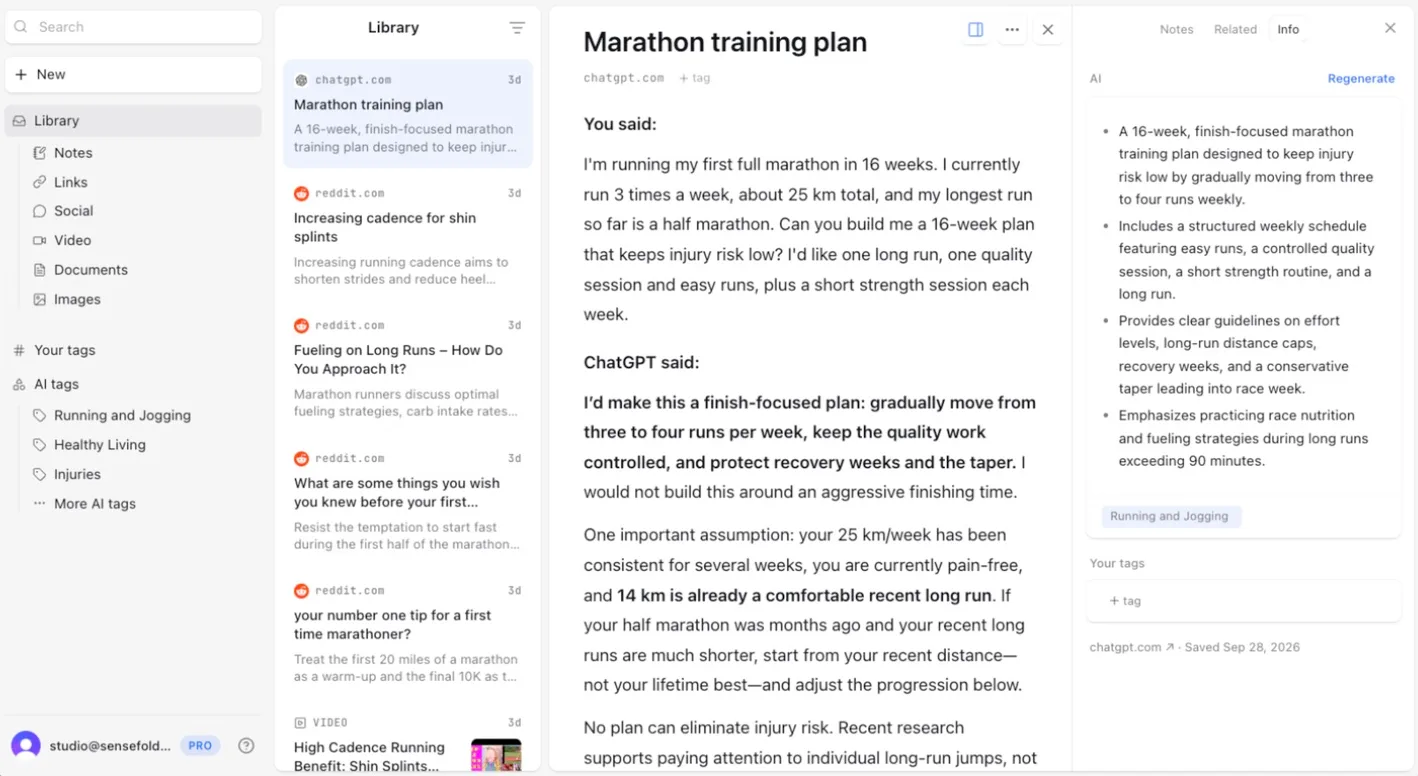
Open the ChatGPT thread where you asked for the plan, open Sensefold from the Chrome toolbar, and choose Capture this page. Before you save, the side panel shows a free preview of the conversation and its summary, with suggested tags you can edit. Click Save. The whole conversation lands in your library as speaker-labelled Markdown, each turn under You said or ChatGPT said, with a summary and tags beside it. The sidebar of forty chats no longer matters.
Save the threads and the videos
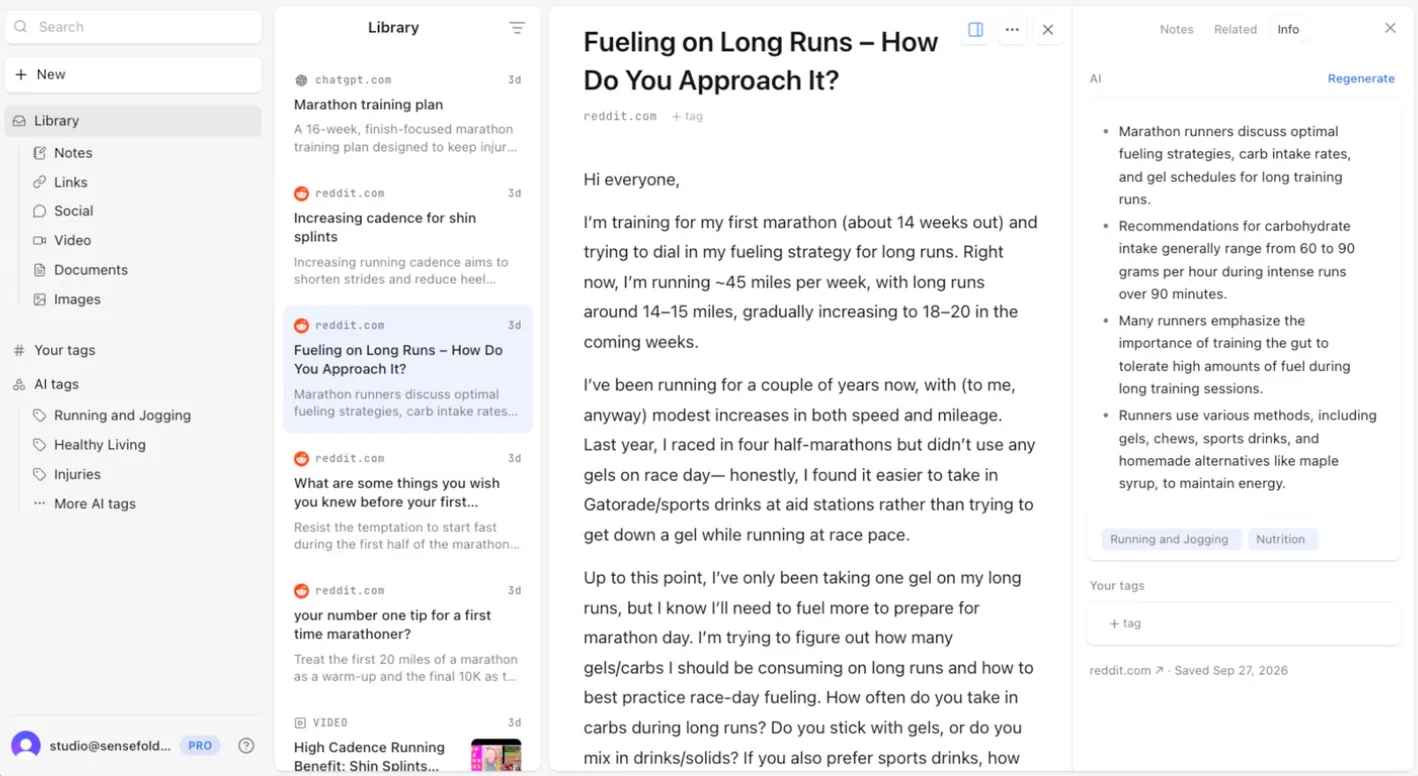
Open a Reddit thread and click the same button. The extension keeps the replies that are shown on the page, in order, so the thread arrives as a discussion and not just the opening post, with a summary that pulls out what matters and tags a search can lean on later. YouTube videos arrive with their transcript, so what a coach says at minute nine is searchable text.
Keep a short log
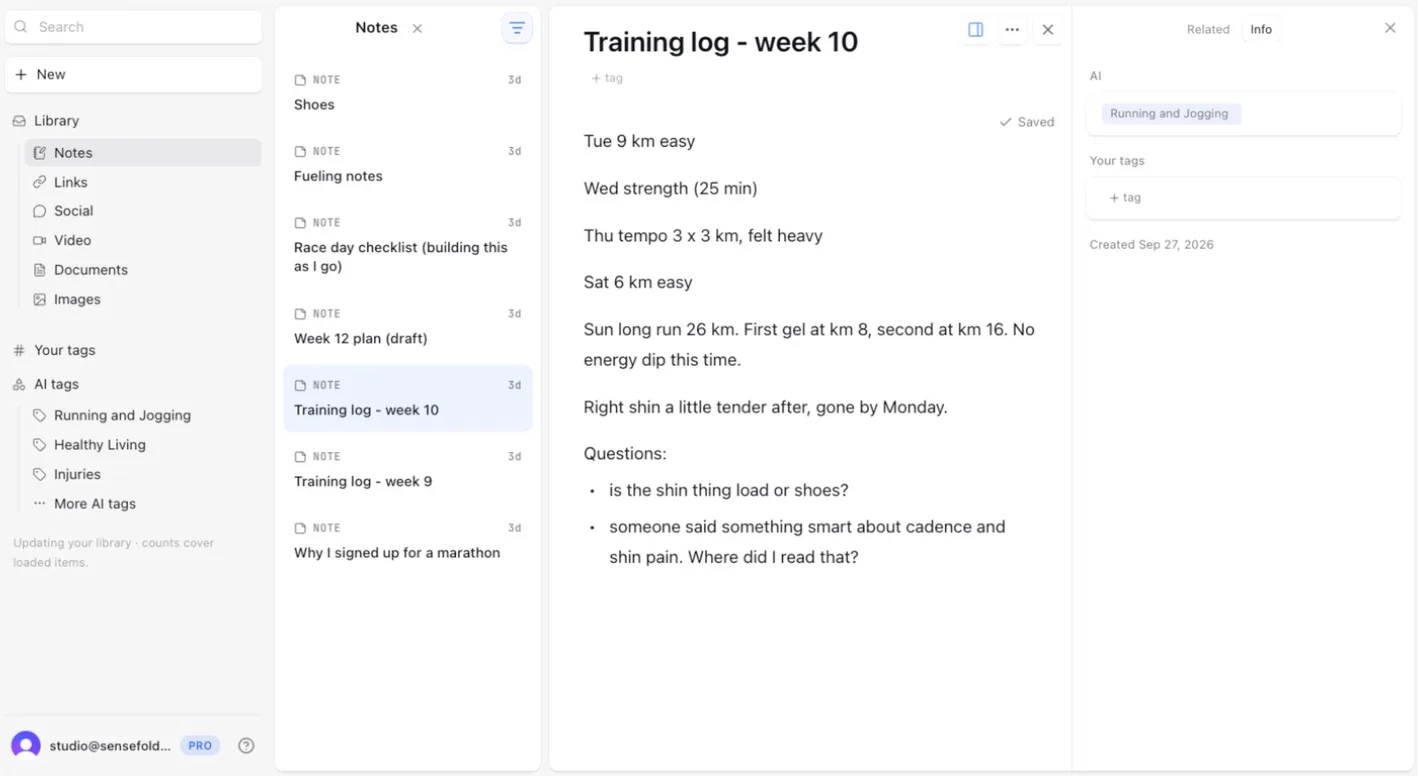
The rest is yours: a few lines a week on what you ran and what you are unsure about. Sensefold's automatic AI adds tags to a note so search can find it, but it never summarizes or rewrites a word of it. These notes are what make the answer later about you rather than about marathons in general.
Ask Claude about it
In Claude, with Sensefold connected on an edit tier, the runner typed:
Look through my Sensefold library and adjust week 12 of my marathon plan. My right shin was tender after last Sunday's 26 km long run. Tell me which saved items you used.
Claude searched the library and opened what it needed. The share page shows the calls only as "Used 5 tools"; in Sensefold's tool set, searching is search_hub, which returns each match with its title, summary, tags, a snippet and a sensefoldUrl link, and reading an item in full is get_item. The answer led with something no generic training advice could have said: the week 12 draft had far more running in it than the runner's own plan intended. The plan had week 12 as a recovery week, about 36 km with a 20 km long run; the draft had about 58 km, goal-pace work and a 30 km long run. The logs showed weeks 9 and 10 already running above plan.
From there Claude rebuilt the week around the plan's own rules: back to about 36 km, the long run cut to 20 km and used to rehearse race-day fueling with gels at km 8 and km 16, because the week 10 log said that timing worked. It answered both open questions from that log: the load, not the shoes, was the clearer cause, though it still suggested saving the first long run in the race shoe for week 13 or 14; and the cadence advice was in several saved items, which it named, among them the Reddit thread on cadence and one of the YouTube videos. It ended with the list it was asked for: ten saved items, namely the week 12 draft, the ChatGPT training plan, the week 9 and week 10 logs, the shoes note, three YouTube videos, the Reddit thread on cadence, and the note on why the runner signed up. It also flagged that there was no week 11 log and said to get the shin checked by a physio or sports doctor if it did not settle.
Reading never spends credits, so this part is free however often you ask. And the library informs the answer; it does not replace a physio.
Notice what did not happen. Sensefold did not answer the question; it has no chat of its own. Claude answered, from items it fetched over MCP. That is the design: the reasoning lives in whichever AI you already use, and the library is the context it reads.
Have Claude write it back
Claude offered to save the revised week into the draft note. The runner replied:
Yes. Save it to my Week 12 plan (draft) note.
Claude called get_item to read the note's current version, then update_note with the new text and that version, and reported the note was now at version 4, with the original draft kept at the bottom for reference. Because the write sent the version it read, it could not silently overwrite a change made elsewhere in the meantime.
In the app, the note's History drawer shows the write as its own entry marked AI, with a line-by-line diff and a way back to any earlier version.
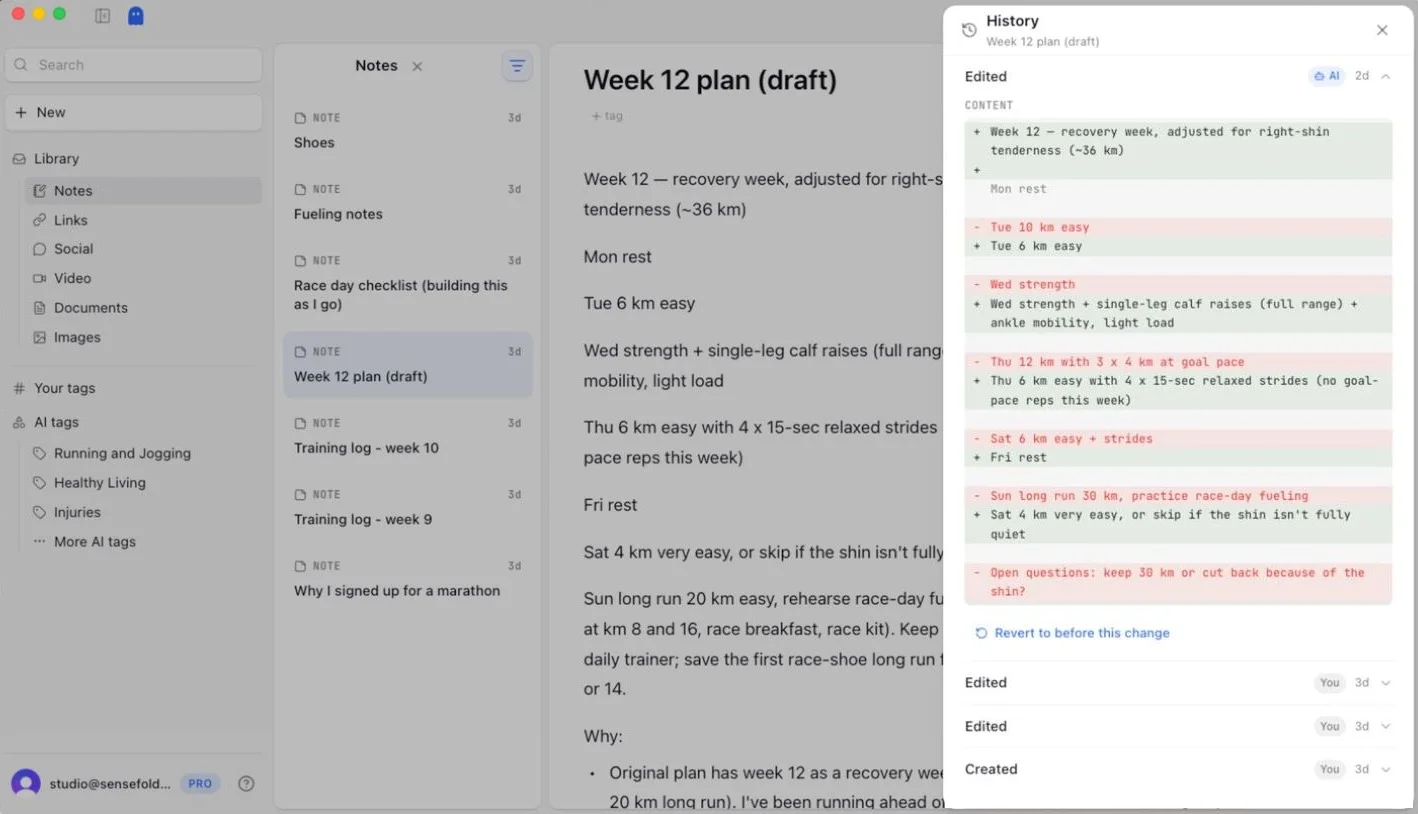
Every version stays, and going back is the "Revert to before this change" link under the entry. Had the runner connected ChatGPT or Cursor as well, the revised week would be there the next time either of them is asked, with no re-pasting and no re-explaining.
So the loop runs: capture when you find something, enrichment the moment you save, and in week ten any AI you use reads it and writes back.
Choosing the library
If you are evaluating tools for this, the three steps above are the test. Can it capture from your browser, your phone, and a paste, including an AI conversation? Does it summarize, tag, and OCR captures automatically, while leaving your own notes alone? Can the AI you already use read it over an open protocol, with permissions you can scope and writes you can revert? And can you leave with everything, in a format you can read without the product? Sensefold exports the whole library as a Markdown ZIP from the web app, and a single item copies as Markdown from the extension or iOS.
If your backlog is mostly articles and links, the capture side is covered in more depth in the guide to the best read-it-later apps. For the habits that keep a library trustworthy over years, see how to organize notes, and for the research workflow on top of it, personal research assistant.
Frequently asked questions
How is an AI second brain different from a notes app?
A notes app is built around a blank page you write into. A second brain in the sense used here is built around captured sources, the articles, threads, PDFs, videos, and AI conversations you did not write, with your notes sitting beside them. The two differences that matter in daily use: enrichment, so captures are summarized, tagged, and searchable by meaning without manual filing, and agent access, so the AI you already use can read the library over MCP instead of you pasting into it. Keep your notes app for drafting if you like it; the library is what the AI reads while you work.
Do I need to code?
No. Capture is a click in the Chrome extension, a share from your phone, or a paste into the web app. Connecting Claude means pasting one address into a settings menu and signing in; ChatGPT works the same way once Developer mode is on, which depends on your ChatGPT plan. Claude Code, Codex, and Cursor each have a short guide on the For agents page, and agents that use skills can load the Sensefold skill file. There is no key to create unless you run an agent on a headless machine, and even then the key is made in the web app and pasted once.
Is my data safe and private?
Your library is private to you, and a connected AI gets tools, not a copy of it: each call returns only what it asked for, nothing is pushed between calls, and no client can read the library in the background. Sensefold never uses your content to train models, and the processors it uses for summaries and OCR are listed on its subprocessors page and contractually barred from training on your content (see the privacy policy). Every connection has a tier you choose, defaults to read-only over OAuth, and can be revoked in one click. One thing to keep in mind: once Claude or ChatGPT has read an item, that text is inside that client's conversation and subject to that provider's own data settings, which Sensefold does not control.
Which AIs work with it?
Claude (claude.ai and desktop), ChatGPT, Claude Code, Codex, Cursor, OpenClaw, Hermes, and any other MCP client that supports remote servers. All of them connect to the same address, https://api.sensefold.app/mcp, and read the same library, so a conversation you saved from ChatGPT is readable from Claude and a note Claude wrote is readable from Cursor.
Can I build an AI second brain with Obsidian or Claude Code instead?
Yes, if you are happy to do the plumbing. An Obsidian vault is a folder of Markdown files, and Claude Code or a local MCP server can read it on the machine where it lives; plenty of open-source setups on GitHub do exactly that. What it does not do on its own is capture: AI conversations, threads with replies, transcripts, and OCR each need another tool, and the vault is reachable only from that machine. The two also mix. Sensefold's export is a ZIP of plain .md files with YAML front matter that any Markdown editor opens, and Claude Code connects to the library over OAuth like any other client.
What does it cost?
Saving is free on every path. AI processing, the summaries, tags, OCR, and transcripts that run on each capture, spends credits; reading over MCP and saving notes do not. Plans start with a 14-day trial, card required, cancel anytime. The current plans are on the pricing page.
If you want to try the three steps on something real, start with one decision you are working through this month: save the article, the thread, and the AI conversation that belong to it, connect the AI you already use, and ask it. Sensefold is built for exactly that loop: one Markdown library that Claude, ChatGPT, and Cursor all read, build on, and write back to.