9 Knowledge Management Best Practices for 2026
Nine knowledge management best practices for 2026: capture-first, automatic enrichment, unified search, agent access over MCP, provenance, and portability.
On this page
- Beyond the junk drawer: building a working memory
- 1. Capture-First Architecture with Multi-Source Ingestion
- Put the inbox where the work happens
- 2. Automatic Content Enrichment and Metadata Generation
- Let the system do the first pass
- 3. Unified Search with Full-Text, Metadata, and Semantic Indexing
- 4. Let your own AI answer from your library, with source attribution
- Answers are only useful when you can verify them
- 5. Cross-Format Content Normalization and Preservation
- Keep the original and create a usable copy
- 6. Smart Tagging and Hierarchical Organization with Automatic Inference
- Taxonomy should emerge from usage
- 7. Contextual Capture with Source Attribution and Temporal Metadata
- Why context improves retrieval quality
- 8. Multi-source synthesis, done by your agent on your context
- 9. Privacy-First, Platform-Agnostic Integration and Data Portability
- Own the library or you'll eventually lose control of it
- The nine practices as a checklist
- From Archive to Engine
- Knowledge management FAQ (2026)
- What are the most important knowledge management best practices?
- What are knowledge base maintenance best practices?
- How is AI changing knowledge management in 2026?
- Can my AI assistant read my knowledge base?
- Does automatic tagging replace manual organization?
- What should you check before uploading private documents to an AI knowledge tool?
- What limits matter most when comparing AI knowledge tools?
Beyond the junk drawer: building a working memory
Your browser has 50 open tabs, your desktop is a minefield of screenshots, and the brilliant idea you had last week is buried in a chat thread you can't find. If your knowledge system feels less like a working memory and more like a junk drawer, the problem usually isn't effort. It's architecture.
This guide covers personal and small-team libraries: the articles, PDFs, videos, threads, notes, and AI conversations one person or a few collaborators collect and reuse. It is not about customer-facing help centers or company wikis, although several of the patterns carry over.
Most people already capture plenty. They save articles to read later, screenshot slides, forward PDFs, pin links, and paste notes into whatever app is closest. Then retrieval fails. Search misses the phrase they remember. Tags drift. Context disappears. The result is a library that keeps growing while usefulness shrinks.
That's why the best knowledge practices for 2026 aren't really about neat folders or heroic manual organization. They're about building patterns into the system itself. Capture happens where you already work. Enrichment happens automatically. Search spans formats. The AI you already use can read the library and point back to what it read. Your system starts acting less like cold storage and more like working memory.
One more shift matters this year. The assistant is no longer inside one app. People move between ChatGPT, Claude, Cursor, Claude Code, and Codex in the same week, so a knowledge base that only one of them can reach is already half an island. The nine practices below treat "can my own AI read this, and can I check what it read?" as an architectural requirement, not a feature.
1. Capture-First Architecture with Multi-Source Ingestion
A knowledge system lives or dies at the point of capture. If saving something takes too many taps, too much context switching, or too many decisions, people don't capture consistently. They tell themselves they'll do it later, and later never happens.
The better pattern is capture-first architecture. Instead of forcing you into one app before you can save anything, the system meets you where the information appears. That's why browser extensions, share sheets, and clipboard capture matter more than many feature comparison pages admit.
Put the inbox where the work happens
A browser side panel is a good example. You are on the article, the thread, the video, or the chat already; one click captures it, the system drafts a summary and tags, you glance at them, and you save. The Sensefold Chrome extension works this way for web pages, social threads with their replies, YouTube pages with transcripts, and ChatGPT, Claude, Gemini, and Grok conversations, each stored as Markdown. The iPhone share sheet plays the same role on mobile. What matters is the shape of the flow: capture, quick review, save. Nothing asks you to file first.
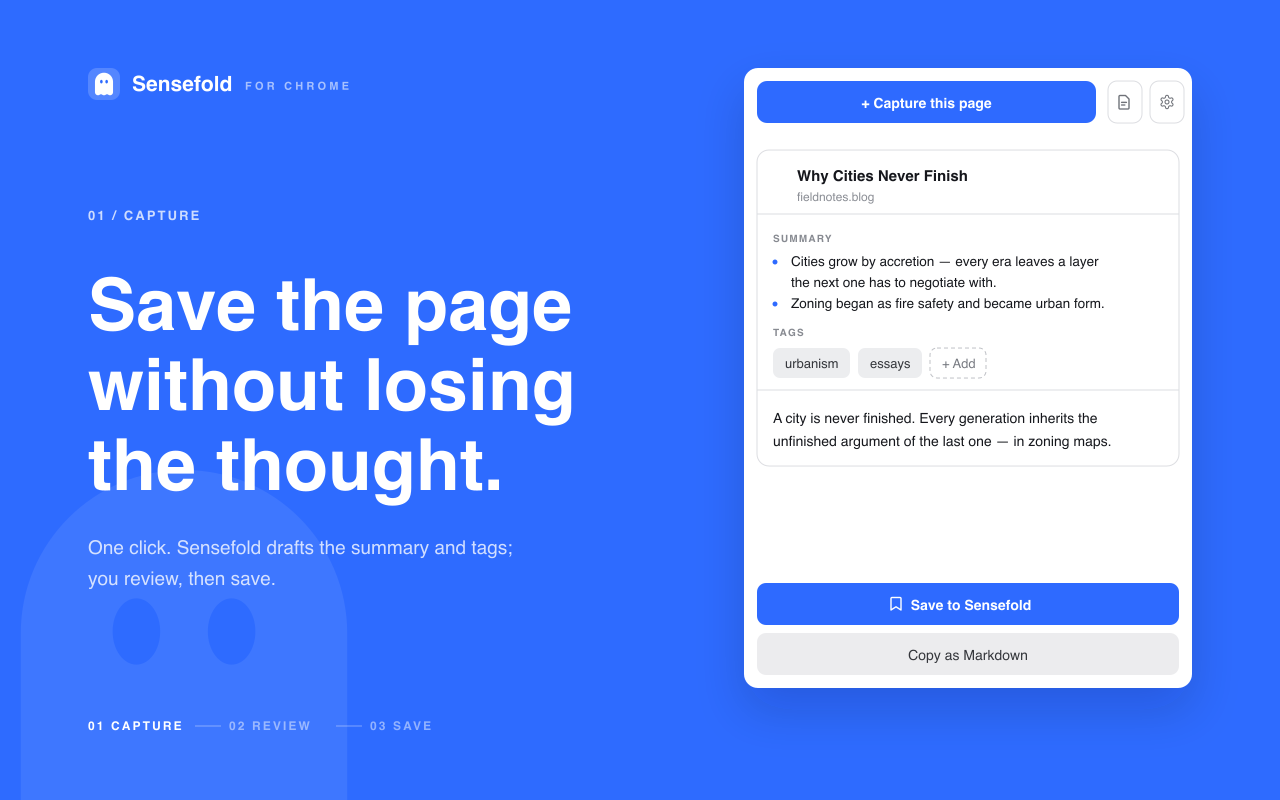
A capture-first system also changes user behavior in a helpful way. You stop treating knowledge management as a separate weekly chore and start treating it as a tiny action embedded in reading, watching, and researching. That's a big difference. One creates backlog. The other creates memory.
Practical rule: If capture requires naming, tagging, filing, and deciding where something belongs before saving it, the system is too heavy.
There is a trade-off. Frictionless capture can turn into indiscriminate hoarding. The fix isn't to add more friction back. It's to define lightweight capture criteria.
- Save for future use: Keep items you'll likely quote, revisit, compare, or build on.
- Skip disposable inputs: Don't save every passing opinion, duplicate headline, or low-signal thread.
- Review source patterns: If one feed keeps producing junk, cut the source instead of cleaning the library forever.
The strongest practices start here because no retrieval layer can rescue information that never made it into the system.
2. Automatic Content Enrichment and Metadata Generation
A common failure point shows up right after capture. Someone saves a useful PDF, screenshot, or article, then plans to summarize it later, tag it properly, pull text from the images, and note why it matters. Later rarely comes. The library grows, but the usable knowledge does not.
The better pattern is automatic enrichment at ingest. As soon as content enters the system, it should go through a first processing layer: summary generation, OCR, source classification, and metadata assignment. Modern tools treat this as architecture, not decoration. The goal is simple. Turn a raw file into something the system can search, relate, and retrieve with context.
Let the system do the first pass
In practice, this means the system handles the repetitive work before a person ever opens the item again. In Sensefold, every capture gets a summary and tags on save; images and PDFs go through OCR, and YouTube pages keep their transcript alongside a chapter guide. Notion uses AI to summarize pages. Apple applies on-device recognition to photos and documents. Google Photos and Drive trained users to expect detected text and inferred content instead of manual filing from scratch.
That changes the economics of knowledge management. A saved screenshot becomes searchable because OCR extracted the text. A long video becomes usable because the transcript and summary expose the key points. A dense PDF becomes easier to revisit because the system already identified topics and likely tags. If you regularly work with reports and scanned documents, this guide on how to search PDF files with OCR and AI shows why enrichment matters so much in daily retrieval.
One boundary is worth stating explicitly, because it decides whether people trust the system with their own writing: automatic enrichment should apply to what you collect, not to what you author. Sensefold indexes your own notes for search but never rewrites them with its automatic AI. Agents you authorize can edit a note, and every such edit is versioned and revertible. That split keeps the machine-generated layer useful without letting it quietly overwrite your thinking.
The trade-off is accuracy. Automatic enrichment is fast, but it will miss nuance in technical documents, misread low-quality scans, and infer the wrong category when context is thin. Good teams account for that. They use generated metadata as a draft layer that reduces labor, not as a final record that should never be questioned.
A practical setup usually follows three rules:
- Generate summaries early: Create a short synopsis at capture time so the item is understandable later without reopening the full source.
- Layer metadata types: Combine tags, extracted text, dates, source data, and transcript text instead of relying on one field.
- Make correction easy: Let users rename, retag, and edit summaries quickly so errors do not harden into bad structure.
User feedback matters here too. If people keep fixing the same wrong labels or rewriting the same vague summaries, the enrichment pipeline needs adjustment. That may mean changing prompts, adding domain vocabulary, tightening source-specific rules, or separating personal notes from reference material before inference runs.
Good enrichment cuts filing work. Great enrichment improves recall, search quality, and downstream synthesis without asking people to behave like librarians.
3. Unified Search with Full-Text, Metadata, and Semantic Indexing
A familiar failure case looks like this. The team saved the contract, the meeting transcript, the screenshot from Slack, and the scanned PDF. Two weeks later, nobody can find the clause they need because each item is searchable in a different way.
That is not a content problem. It is an indexing design problem.
The pattern that works is a single retrieval layer built from several indexes at once. Full-text handles exact language. Metadata handles constraints like source, date, author, or format. Semantic indexing handles the messy reality that people often remember the idea, not the wording.
Obsidian is effective for local text retrieval and linked notes. Notion gives users page search plus database filters. Larger teams often use Elasticsearch or a similar engine underneath because one index rarely covers PDFs, transcripts, screenshots, web clips, and notes equally well. Sensefold's web app runs hybrid keyword-plus-semantic search over everything you saved, including OCR text and transcripts, and exposes the same search to your AI through the search_hub tool. Format-specific problems usually point back to the same architectural answer: one search surface, multiple retrieval methods behind it. This is where knowledge management best practices become a systems problem rather than a filing problem.
The user should not have to guess where the system stored the useful part. If a date lives in metadata, a quote lives in OCR text, and the core idea only shows up in an embedding, the search layer still needs to return the right item from one query box.
Three index types usually carry the load:
- Full-text indexing: Best for exact terms, product names, filenames, quoted language, and known phrases.
- Metadata indexing: Best for narrowing by source, person, project, content type, created date, or status.
- Semantic indexing: Best for concept-level recall when the query and the document use different words.
Implementation quality separates a pleasant demo from a dependable system. Semantic retrieval improves recall, but it can also pull in loosely related material. Metadata filters improve precision, but only if the fields are clean enough to trust. Full-text search is fast and predictable, but weak on paraphrase and cross-format ambiguity.
Good systems combine the three and expose the trade-off clearly. Search first. Filter when needed. Rerank results using semantics instead of replacing exact match entirely.
One more rule is worth adopting. Index derived content, not just original files. That includes OCR text from scans, transcript text from video, generated summaries, and normalized document titles. Without that layer, "unified search" is just a nicer label on fragmented storage.
Search quality shapes behavior. If retrieval feels unreliable, people stop searching, ask a coworker, or save duplicate copies in personal folders. If retrieval is fast and accurate, the knowledge base starts acting like infrastructure instead of archive.
4. Let your own AI answer from your library, with source attribution
Search boxes are efficient when you know what you're looking for. They are less efficient when you want an answer assembled from multiple notes, articles, or transcripts. That's where letting an assistant read the library starts to matter.
Connecting the assistant you already use changes the retrieval model from "find me the document" to "answer this from my library", inside the chat you already have open. The implementation details decide whether that's useful or dangerous. Without source attribution, an answer is confident paraphrase with no audit trail. Liu et al. measured this on commercial generative search engines and found that only about half of generated sentences were fully supported by their citations (Evaluating Verifiability in Generative Search Engines, 2023). Your own library deserves a higher bar than the open web.
Answers are only useful when you can verify them
Sensefold is a personal context: one private, model-independent space where articles, PDFs, videos, threads, notes, and AI conversations are stored as Markdown, enriched with summaries, tags, and OCR on save, and readable and writable by any AI you use over MCP. It does not ship a chat of its own. Instead, Claude, ChatGPT, Claude Code, Codex, Cursor, OpenClaw, Hermes, or any other MCP client connects to https://api.sensefold.app/mcp through paste-and-authorize OAuth or a revocable Agent key, then calls search_hub and get_item to read what you saved. Every search result carries a link to the saved item and to the original source, so the assistant can cite what it read and you can open it. The full list is in the MCP tools reference.
People use knowledge systems for work that has consequences. Writers need citations. Researchers need provenance. Operators need to know whether an answer came from official documentation or from a random saved thread. The answer alone isn't enough. (The argument for keeping citations attached to AI answers is spelled out in why answers from your saved content need source citations.)
A trustworthy connected-assistant setup usually includes a few visible signals:
- Source links: Every claim should point to the saved item it came from and, from there, to the original URL.
- Boundary cues: It should be clear whether the answer comes from the library, from the model's general knowledge, or both. Asking the assistant to answer "only from my saved items" and to list what it searched is a cheap habit that makes the boundary visible.
- Scoped access: The assistant should hold the narrowest key that does the job. Sensefold's Agent keys come in
read_only,edit, andfulltiers, and any write an agent makes is versioned and undoable.
There is a real trade-off here. An assistant reading your library is faster than manual browsing, but it can flatten nuance. A long source with caveats can be reduced to a neat paragraph that sounds more settled than it is.
Field note: If a setup can answer questions but can't show its working, don't use it for anything you may need to defend later.
This is one of the clearest shifts in modern knowledge work. Retrieval is no longer just about locating documents. It's about compressing them into an answer while preserving enough traceability that the user can trust, inspect, and challenge the result.
5. Cross-Format Content Normalization and Preservation
Users don't think in file formats, but most systems still do. That's why knowledge gets scattered. Web pages go to one app. PDFs go somewhere else. Photos live in a camera roll. Screenshots pile up on a desktop. Video links sit in bookmarks with no transcript. Chats stay trapped in the tool that generated them.
A stronger architecture ingests all of it into one library while preserving the original form. The key phrase is both parts. Normalize for search and synthesis, but preserve the original for fidelity.
Keep the original and create a usable copy
The most portable normalization target today is plain Markdown. A ChatGPT or Claude conversation saved as speaker-labelled Markdown is readable by a human, searchable by a keyword index, and consumable by any other model. A thread saved with its replies keeps the argument, not just the opening post. Sensefold normalizes every capture to Markdown for exactly this reason, while keeping the original URL, file, or video attached. Zotero has long done something similar for research workflows by preserving PDFs and web captures alongside metadata. Apple Notes and Notion also support mixed media, but their usefulness depends on whether that mixed media is retrievable later.
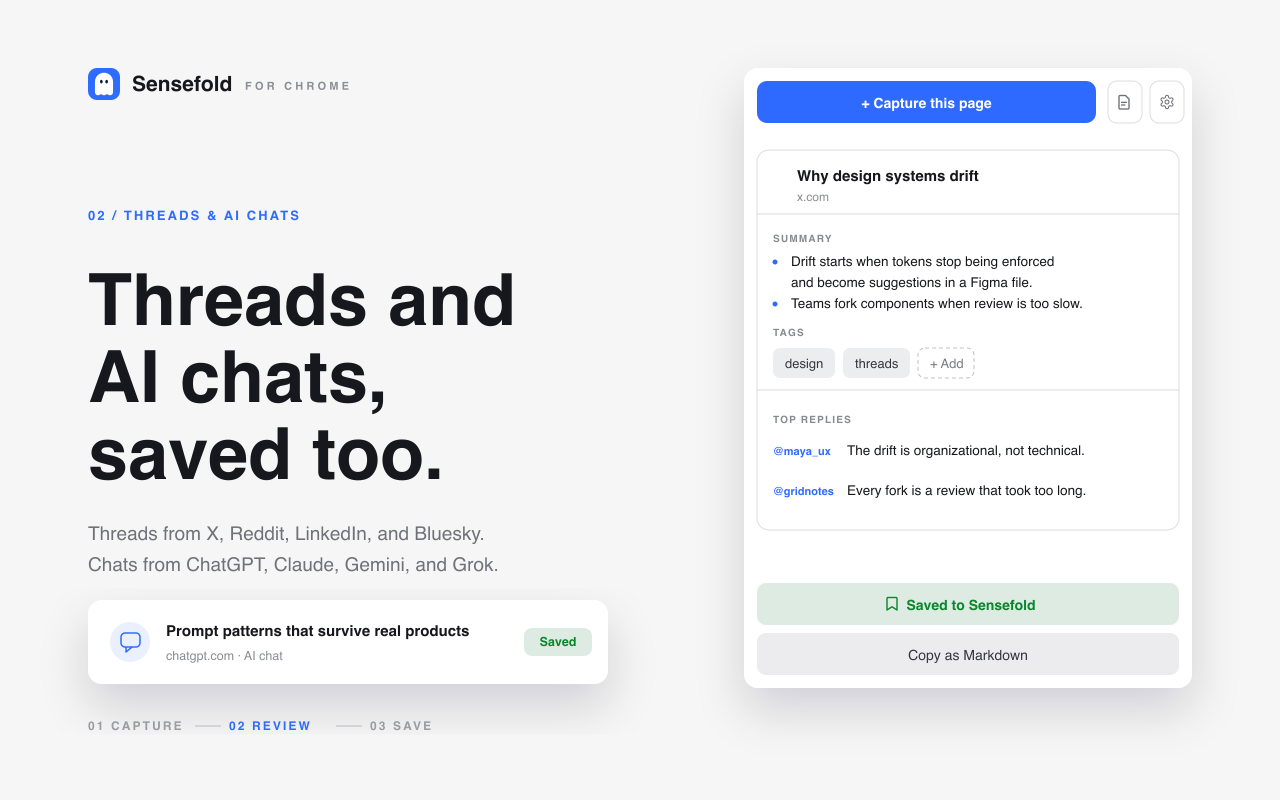
The preservation side matters more than many teams realize. A plain text extract may be enough for search, but not for trust. If you saved a chart-heavy PDF, a slide deck, or a visual thread, you'll often need the original layout later to understand what the author meant.
Here's the balancing act:
- Normalize for utility: Extract text, generate summaries, and create search indexes.
- Preserve for reference: Keep the original file, page, image, or video attached.
- Render by format: PDFs should feel like PDFs. Images should remain viewable. Videos should keep transcript links.
What doesn't work is forced flattening. If every input becomes a generic note card, users lose the very context that made the material valuable. Good systems respect the source medium while still making the content searchable across the whole collection.
That becomes even more important as more research lives in screenshots, short videos, transcripts, and saved AI chats rather than in neat text documents.
6. Smart Tagging and Hierarchical Organization with Automatic Inference
A team saves 200 useful items in a month. By month three, nobody agrees whether a sales deck belongs under "enablement," "product marketing," "Q3 launch," or all three. That is the point where manual organization stops being a discipline and starts becoming drag.
Start with the mess, not the taxonomy. AI can suggest topics, projects, and parent categories at capture time. People then keep, merge, or rename what proves useful in real work. The system does the first pass. Users shape the durable structure.
Taxonomy should emerge from usage
Evernote combines notebooks with tags. Obsidian users often rely on lightweight hierarchies through nested tag conventions. DEVONthink groups related material through analysis. Different products make different interface choices, but the architectural pattern is consistent. Use inference to reduce filing effort, then give people a simple way to correct the model.
If you want a practical model for evolving that structure, this guide on how to organize notes without creating clutter is a good reference point. Start broad. Watch retrieval behavior. Split categories only when people repeatedly need a cleaner distinction.
A few rules make inferred tagging more useful over time:
- Favor durable nouns: Projects, customers, products, topics, and people usually stay meaningful longer than campaign names or one-off tasks.
- Keep hierarchy shallow: One or two parent levels help browsing. Deep trees create filing debates and inconsistent placement.
- Merge synonyms early: "AI," "artificial intelligence," and "machine learning" should not drift into separate buckets unless the distinction matters to your work.
- Review by retrieval, not aesthetics: If a tag helps people find and connect material, keep it. If nobody uses it, remove it.
A true test is retrieval flexibility. A good taxonomy lets someone reach the same item through several paths: topic, project, person, or inferred theme. A brittle taxonomy gives each item one "correct" home and turns re-finding into guesswork.
This is also where trade-offs matter. More automation increases coverage, but it can introduce noisy tags. More manual control improves precision, but it raises the cost of capture and people stop classifying consistently. Strong systems choose recall first, then make cleanup easy. That is usually the right call for growing libraries, especially when the collection spans meetings, PDFs, links, transcripts, and saved chats. It also helps when the cleanup can be delegated: an agent with an edit key can retag a batch of items through update_tags, and because each change is versioned you can revert a bad pass instead of undoing it by hand.
7. Contextual Capture with Source Attribution and Temporal Metadata
You save a sharp quote from a product memo, a useful answer from Slack, and a screenshot from a vendor dashboard. Three months later, all three are still in your system, but one question decides whether they are useful or disposable. Where did each one come from, and what was true at the time?
That is the job of contextual capture. Capture should store the content and the surrounding frame together. Source URL, author, conversation thread, capture date, and last-modified date all affect how the item should be interpreted later.
This pattern matters because retrieval is not the only goal. Teams also need to verify, compare, reuse, and sometimes challenge what they saved. A clipped paragraph without provenance can still match a search query, but it cannot reliably support a decision, a citation, or an audit trail.
Why context improves retrieval quality
Source links and timestamps are the right architectural choice for AI-assisted retrieval. The model can answer with more confidence when it knows whether a note came from an internal doc, a meeting transcript, a saved article, or a saved chat. Zotero has long handled this well for research workflows through citation metadata. Notion can support the same pattern, but only if teams build the database fields and relations with discipline. Sensefold stores the source URL and capture time with every item and hands both back to a connected assistant, which is what lets the assistant say "this came from a thread you saved in March" rather than presenting it as timeless fact.
Time changes meaning.
An API reference saved last week may still be current. A pricing page saved nine months ago may be wrong. A personal note from a strategy offsite may reflect an idea your team has already rejected. Without temporal metadata, the system treats all three as equally current and equally trustworthy.
Keep enough metadata to reconstruct the path behind the note, not just the note itself.
In practice, contextual capture supports three useful behaviors:
- Re-finding by memory cues: People often remember when or where they saw something before they remember the exact wording.
- Attribution with less cleanup: Source details stay attached, which makes later quoting, sharing, or compliance review easier.
- Change tracking over time: Teams can compare what was believed in March versus what was updated in June.
There is a trade-off here. Richer metadata improves traceability and ranking, but it can also create noisy records if every capture dumps in low-value fields. Good systems solve that by collecting provenance automatically and showing only the fields that help with retrieval, trust, or filtering. The pattern is simple. Capture broadly, preserve context, and surface the metadata that helps people judge relevance fast.
This gets more important as knowledge spreads across chat, email, docs, transcripts, browser saves, and AI conversations. Once information starts moving through those channels, source attribution and temporal metadata stop being nice extras. They become part of the architecture that keeps a knowledge base usable under real working conditions.
8. Multi-source synthesis, done by your agent on your context
A product lead preparing for a planning review rarely needs one note. The real answer is spread across interview clips, pricing docs, Slack threads, saved competitor pages, meeting notes, and old AI chats. Retrieval gives you fragments. Synthesis helps you form a position.
Sensefold does not run its own research or synthesis mode. It keeps the corpus normalized to Markdown and exposes it over MCP, so the synthesis happens in the assistant you already pay for. If you allow it, that assistant can also write the resulting brief back into the library as a note through save_note or update_note, versioned and revertible, next to the sources it drew from. A step-by-step version of this workflow is in the personal research assistant guide.
The useful pattern is simple: gather the relevant material, compare sources, identify agreement and conflict, and produce a working summary that still points back to evidence. The goal is faster judgment with less manual stitching. Good knowledge management best practices make that loop easier without hiding the evidence behind it.
Perplexity applies a similar model to web research. Google Scholar is still useful for discovery, but it usually leaves the synthesis work to the user. GitHub search can serve the same function for technical teams tracing decisions across code, issues, and docs.
The pattern works best when the assistant behaves like a research assistant, not a confident ghostwriter. Good setups surface related sources, show where evidence conflicts, and let users inspect the chain behind a claim. Weak ones flatten everything into a tidy summary that hides disagreement, source quality, and missing context.
Three design choices make multi-source synthesis reliable enough for real work:
- Evidence coverage, not just answer generation: Ask the assistant to pull from enough of the corpus to represent the actual state of the material, including contradictory notes and outdated assumptions that still influence decisions.
- Drill-down paths: Every synthesized point should be traceable back to the underlying saved items so a user can verify, quote, or challenge it.
- Visible uncertainty: The assistant should say when the evidence is thin, mixed, or stale instead of smoothing over gaps.
There is a trade-off. Broad synthesis saves time, but it can also compress nuance. The common failure mode is rarely "the model said something random." It is "the summary sounded plausible enough that nobody checked the source spread." Teams avoid that by treating synthesis outputs as working briefs, not final truth.
As noted earlier, strong knowledge programs increasingly rely on version history, edit visibility, and feedback loops. The same rule applies here. If the source corpus changes, the synthesis should be revisitable, inspectable, and easy to refresh without losing the reasoning trail. Keeping the brief as a versioned note in the same library, rather than in a chat transcript that scrolls away, is the practical way to do that.
Done well, this pattern changes how people use a knowledge system. They stop hunting for isolated notes and start using the library to test conclusions, compare perspectives, and produce better decisions faster.
9. Privacy-First, Platform-Agnostic Integration and Data Portability
Knowledge systems accumulate some of your most sensitive material: draft ideas, saved research, meeting notes, screenshots, vendor evaluations, personal study paths, AI chats, and half-formed arguments. If that library isn't private by default and portable by design, you are effectively renting your memory from someone else.
Privacy and portability are often treated as separate concerns. In practice they are linked. A tool that makes export difficult usually weakens user control in other ways too.
Own the library or you'll eventually lose control of it
Think of this section less as a product checklist and more as an exit test. If you stopped using the tool next month, could you understand where your files went, export them cleanly, and move on without rebuilding your library from scratch? Shutdowns are not hypothetical: Mozilla shut down Pocket in July 2025 and kept an export-only window open until November 2025, after which data deletion began.
That is the practical standard. A trustworthy tool should tell you which processors touch your files, what gets stored, and how export works before you commit. Obsidian appeals to users who want local-vault control because notes are plain Markdown files on disk. Standard Notes builds around encryption and export. Apple Notes benefits from strong ecosystem integration, though users still need to think carefully about lock-in and interoperability.
Sensefold passes this test today: everything you save is normalized to Markdown, the web app exports your whole library as a Markdown ZIP, individual captures copy as Markdown from the extension and the iOS app, your assistant reads and writes over MCP with a revocable key scoped read_only, edit, or full, and every processor that touches your content is listed publicly at /subprocessors, with the retention and training boundaries spelled out in the privacy policy.
Use three checks:
- Plain-language privacy expectations: Users should understand what gets processed, stored, and shared, and whether their content is ever used to train models.
- Functional export: Markdown, JSON, or other open formats should preserve structure well enough to migrate, and the export should cover the whole library, not one item at a time.
- An open protocol, not a walled API: MCP or a plain, documented API keeps the tool from becoming an island; if only the vendor's own assistant can read your library, you have traded one lock-in for another.
One more trade-off is worth stating clearly. Deep AI features often require processing content in ways that raise legitimate privacy questions. That doesn't mean avoiding AI. It means demanding explicit boundaries, transparent defaults, and a public explanation of where data goes.
This is one reason modern knowledge practice increasingly favors federation over monolithic consolidation. One library can serve several assistants without forcing every piece of knowledge into one closed box. Privacy-first, platform-agnostic design accepts that users need one working memory, but not one vendor forever.
The nine practices as a checklist
The original version of this article ended with a scored comparison table. It had no sources behind the scores, so it is gone. What follows is the same nine practices as questions you can actually check against a tool or your own setup.
| Practice | What to check |
|---|---|
| 1. Capture-first architecture | Can you save from the page, thread, video, or chat you are already on, with review after capture instead of filing before it? |
| 2. Automatic enrichment | Do captures get summaries, tags, OCR, and transcripts without prompting, and is your own writing left alone? |
| 3. Unified search | Does one query box cover exact terms, metadata filters, and meaning, over derived text as well as originals? |
| 4. Your own AI, with attribution | Can the assistant you already use read the library over MCP, and does every answer link back to the saved item? |
| 5. Normalization and preservation | Is everything normalized to a portable format such as Markdown while the original file, page, or video stays attached? |
| 6. Inferred tagging | Does the system suggest structure first and make correction, merging, and reverting cheap? |
| 7. Contextual capture | Are source URL and capture time stored with every item and handed to the assistant that reads it? |
| 8. Agent-driven synthesis | Can your assistant compare sources across the library and write the brief back as a versioned note? |
| 9. Privacy and portability | Is there a whole-library export in an open format, a public processor list, and a scoped, revocable key for agents? |
From Archive to Engine
Effective knowledge management isn't about building a perfect archive. Striving for such an archive often results in a very organized graveyard. The system looks tidy, but it doesn't help much at the moment of need.
What works is a set of reinforcing patterns. Capture has to be easier than forgetting. Enrichment has to happen faster than backlog. Search has to match the messy way people remember things. The assistant that reads the library has to hand back sources, not just prose. Preservation has to respect format, context, and provenance. Portability has to protect your future options.
That is why the most useful guidance now looks architectural rather than procedural. Folder advice and tagging advice still matter, but only inside a system designed for modern inputs. Today's knowledge isn't just typed notes. It's PDFs, screenshots, videos, AI chat threads, web articles, transcripts, snippets from messaging apps, and visual artifacts that don't fit neatly in old document-first systems.
The systems getting traction reflect that change. They capture from wherever work happens. They generate summaries and metadata automatically. They index across text, OCR, tags, and semantic meaning. They let the AI you already use read what you saved and show where each answer came from. They preserve originals. They stay portable enough that you don't have to choose between capability and control.
There's also a practical reason to take this seriously now. Search friction and invisible knowledge loss are expensive even when they don't show up on a dashboard. People route around broken systems. They ask colleagues instead of searching. They duplicate work because the previous answer may as well not exist. They save great material and then can't retrieve it when it matters. From the outside, the knowledge base looks full. From the user's perspective, it's absent.
The fix doesn't require rebuilding everything at once. Start with the weakest point in your current setup. For some people that's capture. For others it's retrieval, provenance, or export. Improve one architectural layer, then add the next. A lighter capture flow makes enrichment more useful. Better enrichment makes search smarter. Better search makes a connected assistant trustworthy. Provenance and portability make the whole thing durable.
A working memory isn't just a place to store information. It's a system that helps you return to the right idea, in the right context, at the right moment. That's when knowledge management stops being maintenance work and starts becoming a cognitive advantage.
Knowledge management FAQ (2026)
What are the most important knowledge management best practices?
The practices that matter most are architectural, not procedural: make capture easier than forgetting, enrich content automatically at ingest, search across full text, metadata, and meaning at once, and let the AI you already use answer from the library with links back to the saved items. Neat folders help far less than a system that summarizes, indexes, and recalls on its own. The nine practices above cover capture, enrichment, search, agent access, normalization, tagging, provenance, synthesis, and portability.
What are knowledge base maintenance best practices?
Maintain by retrieval, not by tidying. Review the tags people actually search and merge the synonyms; prune sources that keep producing junk instead of cleaning their output forever; treat generated summaries and tags as drafts and fix the ones that mislead; keep source URLs and capture dates on every item so stale material is visibly stale; and run a periodic export to confirm your data still leaves cleanly. If an agent does part of the maintenance, give it an edit-scoped key so every change is versioned and revertible.
How is AI changing knowledge management in 2026?
AI is moving knowledge management from static storage to working memory in two ways. On the way in, tools run OCR, summaries, and tagging automatically on save and search by concept rather than exact wording. On the way out, the assistant you already use can read the library directly over an open protocol such as MCP, so the work moves from organizing to using what you saved, in the chat you already have open.
Can my AI assistant read my knowledge base?
Yes, if the knowledge base speaks an open protocol. With Sensefold, Claude, ChatGPT, Claude Code, Codex, Cursor, OpenClaw, Hermes, or any MCP client connects to https://api.sensefold.app/mcp by pasting the URL and authorizing over OAuth, or with an Agent key scoped read_only, edit, or full. The assistant then searches and reads your items, and each result carries a link back to the saved item and its source. Setup guides per client are under /docs/mcp-tools/ and /for-agents.
Does automatic tagging replace manual organization?
No. Automatic inference does the first pass, suggesting tags and other lightweight metadata at capture time, but people still shape the durable structure. The reliable pattern is recall first, cleanup easy: let the system tag broadly, then keep, merge, or rename what proves useful in real retrieval. Treat generated metadata as a draft, not a final record.
What should you check before uploading private documents to an AI knowledge tool?
Check four things: where files are processed, which third parties touch them, what gets retained, and how easy it is to export later. Vague privacy language is not enough; the safer tools publish their processing chain, as Sensefold does at /subprocessors, and state plainly whether your content is used to train models.
What limits matter most when comparing AI knowledge tools?
The limits that matter are the ones that decide whether the tool works for your actual library rather than for small demo files: file size and page handling for PDFs, indexing depth for long documents, OCR quality on real scans, and whether long items get truncated for summaries or search. Ask for the documented limits before you commit; Sensefold's are on the files and media docs page: 10 MB per upload and 200 pages per PDF. Plans are metered by AI credits and storage rather than by how many items you save; see pricing for the current tiers.
If your current setup still feels like a pile of tabs, screenshots, PDFs, and half-lost ideas, Sensefold is worth a look. The Chrome extension captures pages, threads, videos, and ChatGPT, Claude, Gemini, and Grok conversations as Markdown; every capture gets a summary, tags, and OCR; hybrid search covers the whole library; and the AI you already use reads and writes it over MCP with a key you can scope and revoke. Saving is free, AI processing runs on credits, and your whole library exports as a Markdown ZIP whenever you want it. Details on plans are on the pricing page, and the agent setup is on /for-agents.