Why your AI's answers should cite your own saved sources
An answer you cannot trace to a saved source is a guess. How your AI, connected over MCP, cites the items it read in your library, and how rivals compare.
On this page
- The problem: fluent answers without evidence
- How a citation-grounded answer works over MCP
- How the current tools compare
- What to check before trusting any AI on your saved sources
- The practical workflow
- Frequently asked questions
- Do citations eliminate hallucination?
- Why do most reading apps skip citations?
- Which AI clients can cite Sensefold sources?
- Does Sensefold cite sources during the free trial?
An AI answer is only useful when you can trace it back to something you actually saved. A summary that reads fluently but cannot show its evidence is another loose note, and when you are about to act on that answer, "feels right" is not a standard.
This page explains why citations to your own saved sources are the dividing line, how a citation-grounded answer is produced when your own AI reads your personal context over MCP, and how to evaluate any tool on this axis, including Sensefold.
One thing up front, because it changes how you should read everything below: Sensefold does not answer questions itself. The answer is composed by the AI you already use (Claude, ChatGPT, Claude Code, Codex, Cursor, OpenClaw, Hermes, or any MCP client). What Sensefold does is hand that AI, for every search hit, a link to the saved item and the section that matched, so the AI can cite what it read.
The problem: fluent answers without evidence
Every reading and saving tool now offers some form of summarization or question answering. They share one failure mode: language models produce confident, fluent text even when the underlying facts are wrong or missing. Researchers call it hallucination; in practice it means an answer that reads perfectly and cannot be checked.
For a general chatbot, that is an annoyance. For your personal context, the articles, PDFs, threads, videos and AI conversations you saved because you expected to rely on them later, it is disqualifying. Three specific things break when answers lack citations:
- Auditability. You cannot tell whether the answer came from the article you saved, from the model's training data, or from nowhere.
- Recall trust. Once a library grows past what you can hold in your head, memory stops working. If you cannot verify which saved item supports an answer, you are back to re-searching the open web, the exact problem you were trying to solve.
- Reuse. Research material is only reusable if you can quote its origin. An uncited summary cannot go into a report, a decision doc, or a term paper.
How a citation-grounded answer works over MCP
The mechanics matter, because "has AI" and "cites your sources" are very different engineering commitments.
With Sensefold, the loop has four steps, and only the first three happen inside Sensefold:
- Capture. The Chrome extension saves web pages, social threads, YouTube pages with their transcript, and ChatGPT, Claude, Gemini and Grok conversations as Markdown. PDFs and images are OCR'd on save. Your own notes are stored alongside them.
- Index. Every capture gets a summary and tags automatically, and everything, notes included, is split into retrievable chunks that stay tied to the original item, with the heading path and (for PDFs) the page range each chunk came from. Notes are indexed for search but never rewritten by Sensefold's automatic AI.
- Retrieve. When you ask your AI a question, it calls
search_hubathttps://api.sensefold.app/mcp. Each result carries asensefoldUrl(a deep link to the saved item in your library), the originalsourceUrlif there is one, a snippet, the page numbers that matched, and achunkRef(heading path, page start and end) it can pass toget_itemto read that section with context. - Answer with receipts. Your AI composes the answer from what it read and cites the
sensefoldUrlfor each claim. If retrieval found nothing relevant, an honest client says so instead of improvising.
The output is falsifiable: open the citation, read the saved item, decide for yourself. The link is item-level today: it opens the saved item, and the page numbers or heading path returned with the hit tell you where to look inside it.
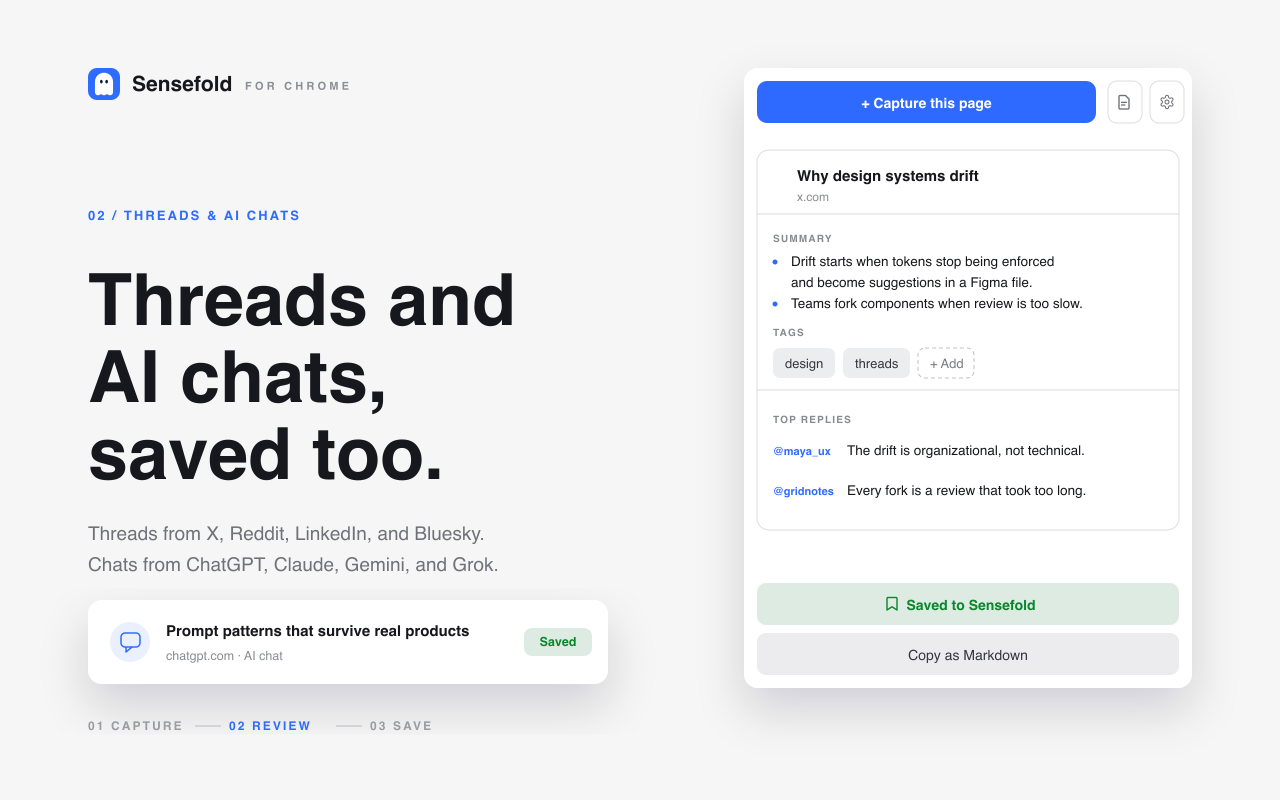
Because AI conversations are captured as items too, a citation can point at the ChatGPT or Claude chat where you worked something out last month, not only at an article. That is the part most tools skip: the reasoning you already did becomes a source your next AI session can quote.
This is also why citations are hard to bolt on later. A tool that summarizes one open document at a time never needs a retrieval layer; an AI that answers across your whole library without one is guessing.
How the current tools compare
Where the major saving and reading tools stand on this axis, based on their official product, help and pricing pages, checked in September 2026. "Cites saved item" means an answer links back to something in your library; "no citation" means the AI feature exists but does not point back at your saved items; "not verified" means we could not confirm the behaviour from official pages and did not test it ourselves.
| Tool | AI answers | Cited to your saved sources? |
|---|---|---|
| Sensefold | None built in; your own AI over MCP, library-wide | Cites saved item: every search_hub hit returns a sensefoldUrl deep link plus the matched section (heading path, page range) for the AI to cite (MCP tools reference) |
| Readwise Reader | Ghostreader inside one document; the official Readwise MCP (mcp2.readwise.io/mcp) gives Claude, ChatGPT, Codex, Cursor, OpenClaw and others hybrid search over your Reader library, and can organize it | Cites saved item via your own AI over MCP; Ghostreader itself works inside the open document (readwise.io/mcp) |
| Matter | Co-Reader on Premium: tap a paragraph for suggested questions and answers, powered by Perplexity | No citation to your library: the sources it shows are web results for the current article (getmatter.com) |
| Cubox | AI Insights (summaries and key points) and AI Ghost Highlights on Pro+AI, $49/year; Pro without AI is $29/year | Not verified: the official pages describe per-item AI reading help, not library-wide answers with citations (cubox.cc/pricing) |
| Instapaper | Per-article Summaries: 5 per month free, unlimited on Premium | No citation: summaries only, no cross-library question answering (Instapaper blog) |
| Raindrop.io | Stella assistant (beta, Pro) chats with your bookmarks and can organize collections; a hosted MCP endpoint (api.raindrop.io/rest/v2/ai/mcp, OAuth 2.1) exposes search, full text and bookmark management to your own AI | Cites saved item: Raindrop states "every answer links to the source" for Stella, and the MCP server returns bookmark full text and metadata (help.raindrop.io/stella, MCP server) |
Three honest observations from that table.
First, per-document AI (Ghostreader, Co-Reader, Instapaper Summaries, Cubox AI Insights) is genuinely useful while you are reading. That is a different job from recalling across everything you saved, and a tool can be good at one without the other.
Second, Sensefold is not alone in letting your own AI read your library: Readwise's official MCP server and Raindrop's hosted MCP endpoint are the closest peers, and both can write as well as read. Do not let anyone, including us, tell you "read and write over MCP" is unique.
Third, the differences you can actually verify are narrower and more concrete: whether AI conversations themselves are saved as citable Markdown items; whether each search hit tells the AI which section matched (heading path, PDF page range) rather than only which item; whether agent access is scoped by a revocable key with read_only, edit and full tiers or a paste-and-authorize OAuth flow; and whether every agent edit is versioned so you can review and revert it. Those are the questions to ask, not "does it have AI".
For side-by-side breakdowns, see Sensefold vs Readwise Reader, Sensefold vs Raindrop.io, Sensefold vs Cubox, Sensefold vs Instapaper and Sensefold vs Matter.
What to check before trusting any AI on your saved sources
A quick evaluation checklist, applicable to any tool and any AI client:
- Ask a question you know the answer to, one whose source you saved last month. Does the answer cite that item?
- Open the citation. Does it land on the actual saved content, or on a title with nothing behind it?
- Ask something your library does not contain. Does the AI admit it, or improvise from thin air?
- Check the tier. Is agent access to your library included in the plan you will actually pay for, and can you scope it to read_only?
- Test non-text content. Screenshots and PDFs are where most libraries silently lose information. Does OCR'd content show up in answers, with the image or the PDF page cited?
- Test an AI conversation. Save a ChatGPT or Claude chat, then ask about it from a different AI. Can the second AI cite the first one's chat?
The practical workflow
The loop that citations make possible:
- Capture the source while context is fresh: one click in the Chrome extension for pages, threads, videos and AI chats; the share sheet on iPhone.
- Let Sensefold summarize, tag and OCR the capture automatically, with the original attached. Write your own notes in the same library; they are indexed but never rewritten by the automatic AI.
- Connect the AI you already use over MCP: Claude, ChatGPT, Claude Code, Codex, Cursor, OpenClaw or Hermes. The overview for any MCP client is on For agents.
- Ask questions later, and inspect the cited items before trusting the answer.
Saving is free; the AI work on captures runs on credits, with a 14-day trial on new subscriptions. Details are on the pricing page. If you ever leave, the whole library exports as a Markdown ZIP from the web app, and any item copies as Markdown from the extension or iOS.
That loop is what separates a personal context from a pile of saved links: the answer is a map back to your own evidence, not a replacement for it.
Frequently asked questions
Do citations eliminate hallucination?
No. Retrieval grounding sharply reduces it and, more importantly, makes the remaining errors detectable, because you can check every claim against the cited item. Treat citations as a verification tool, not a guarantee, and remember the answer is written by your AI client, not by Sensefold.
Why do most reading apps skip citations?
Because per-document summarization is much easier to build than library-wide retrieval. Citing sources across a mixed library of pages, PDFs, images and AI conversations requires chunk-level indexing and OCR of everything at save time, plus a way to hand each hit to the AI with its location.
Which AI clients can cite Sensefold sources?
Any MCP client. Sensefold documents setup for Claude, ChatGPT, Claude Code, Codex, Cursor, OpenClaw and Hermes. Each connects to https://api.sensefold.app/mcp over OAuth or a revocable Agent key, and every search result carries the sensefoldUrl the client can cite. See the MCP tools reference for the full field list.
Does Sensefold cite sources during the free trial?
Yes. Every plan, including the 14-day trial, enriches and indexes what you save, and MCP access is included. Connect your own AI and it can search your library and point back to the saved items it read. See For agents for the setup.